Should Everyone You Email Be in Your CRM?
No.
Your sales CRM and your email marketing tool should live on two different planets. They're separate databases. Not everyone on your newsletter belongs in your CRM, and not everyone in your CRM belongs on your newsletter.
That sounds backward to a lot of people, and I get why. Plenty of software companies have blended the two for years, until it feels like a CRM is a CRM. It isn't.
There are a handful of kinds of CRM out there: analytical CRMs, partner relationship managers, recruiting and HR tools, and whatnot. For a speaker, coach or consultant, only two matter. A sales CRM, and a marketing CRM, which most people just call their email marketing tool.
The sales CRM is for people you reach out to one-to-one. The email tool is for people you talk to one-to-many. Mash them together and it gets really confusing who's actually worth a personal email and who's just reading along.
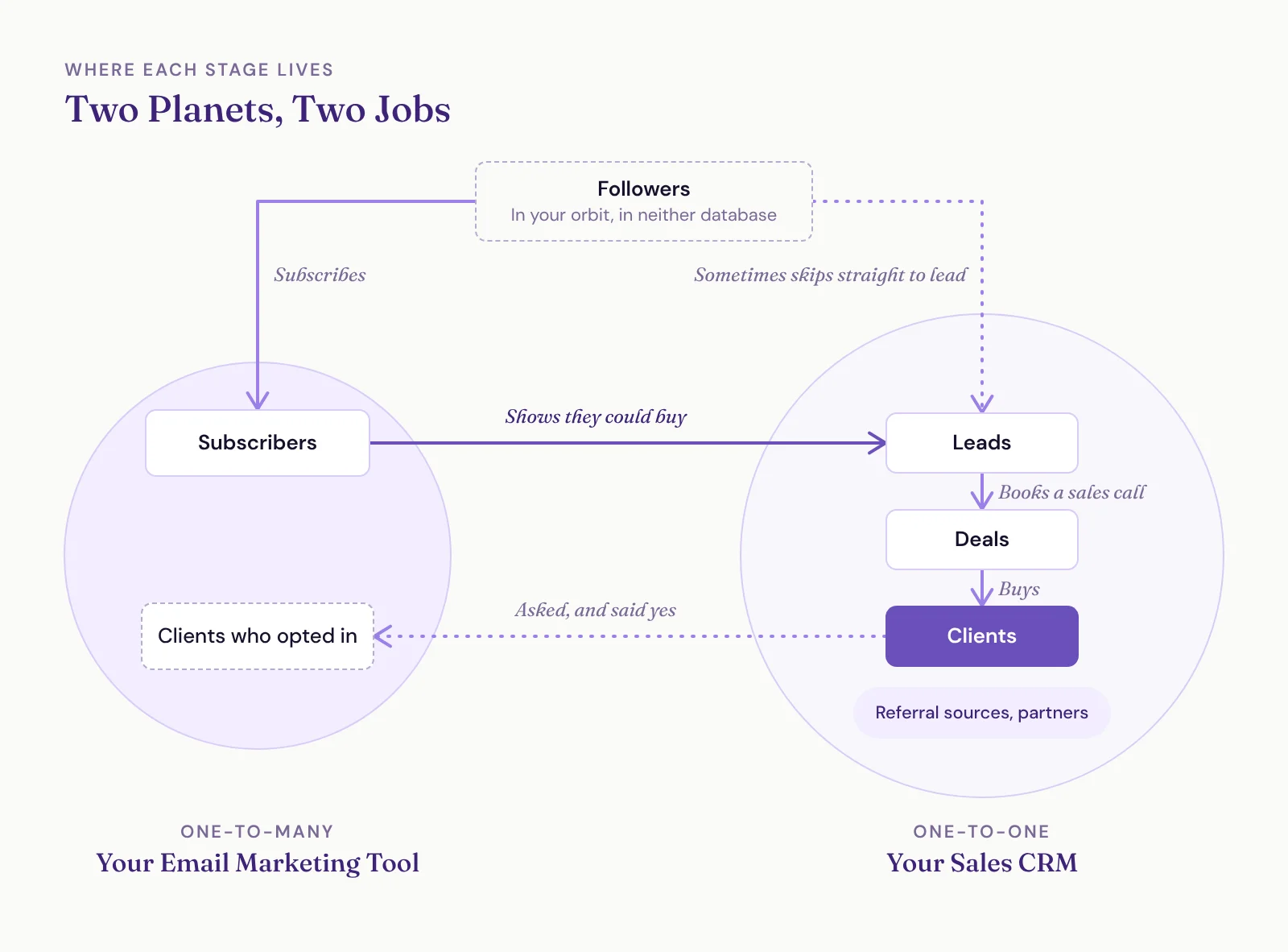
Where Each Stage Lives, from Follower to Client
Here's how people move through your world, from first contact to paying client:
Followers. LinkedIn followers, Instagram followers, people who follow your YouTube channel. They're in your orbit, but they haven't landed on your planet yet. You don't own their contact info, so they're in neither database.
Subscribers. They gave you their email address. They live in your email marketing tool.
Leads. People you believe you could do business with but haven't yet. They live in your CRM.
Deals. A lead books a sales call and there's money on the table. That's when the lead becomes a deal, and it lives in your CRM.
Clients. They bought. They live in your CRM too.
People don't always take every step. Sometimes a follower turns into a lead right away. Sometimes someone never subscribes at all. But generally speaking, that's the progression.
For speakers and thought leaders especially, the subscriber pile gets big. Audience members and content consumers love your stuff but can't buy your core offer, whether that's a keynote, high-ticket coaching or a consulting engagement. You're not going to email them one at a time, so they don't belong in your sales CRM.
You do want to stay in touch, though. They might buy your smaller offers, or get promoted into a seat that can hire you. Your newsletter does that heavy lifting. I go deeper on what to do with attendees who can't hire you in Your Audience Isn't Your Buyer: What to Do With Attendees Who Can't Hire You.
Who Actually Belongs in Your Sales CRM?
Any legitimate business relationship.
Leads come first. They're inbound (they filled out your contact form) or outbound (you're prospecting them cold). Your goal is to follow up until they book a sales call. Then it's a deal, and you move it through your process until they buy or don't.
Then there's everyone else in your business orbit: referral sources, partners, centers of influence, colleagues and business friends. They belong in your CRM as contacts. They're never leads, because they aren't going to buy from you. Give each one a contact type (referral source, partner, vendor or whatever fits your business) so you know who's who.
What doesn't belong is the person who downloaded a PDF two years ago and has opened three newsletters since.
Do You Have a Lead Magnet or a Subscriber Magnet?
Lots of people say they have a lead magnet. Download this PDF, grab this checklist, yada yada. Most of the time, that's really a subscriber magnet. You aren't going to follow up one-on-one with everyone who grabs it, and you have no idea whether they can afford to hire you. So they belong on your email list, not in your CRM.
A true lead magnet tells you two things. They have the problem you solve, and they could buy from you.
Ours at SpeakerFlow is the Flow State Diagnostic. When someone takes it and scores below a certain threshold, we know they have a systems problem. They're at least interested in learning how to fix it, or they wouldn't have taken a diagnostic about it. That makes them worth our one-to-one attention.
I put every form on a website through two tests:
Does this tell me they might want to work with me?
Am I going to personally reach out to them because they filled it out?
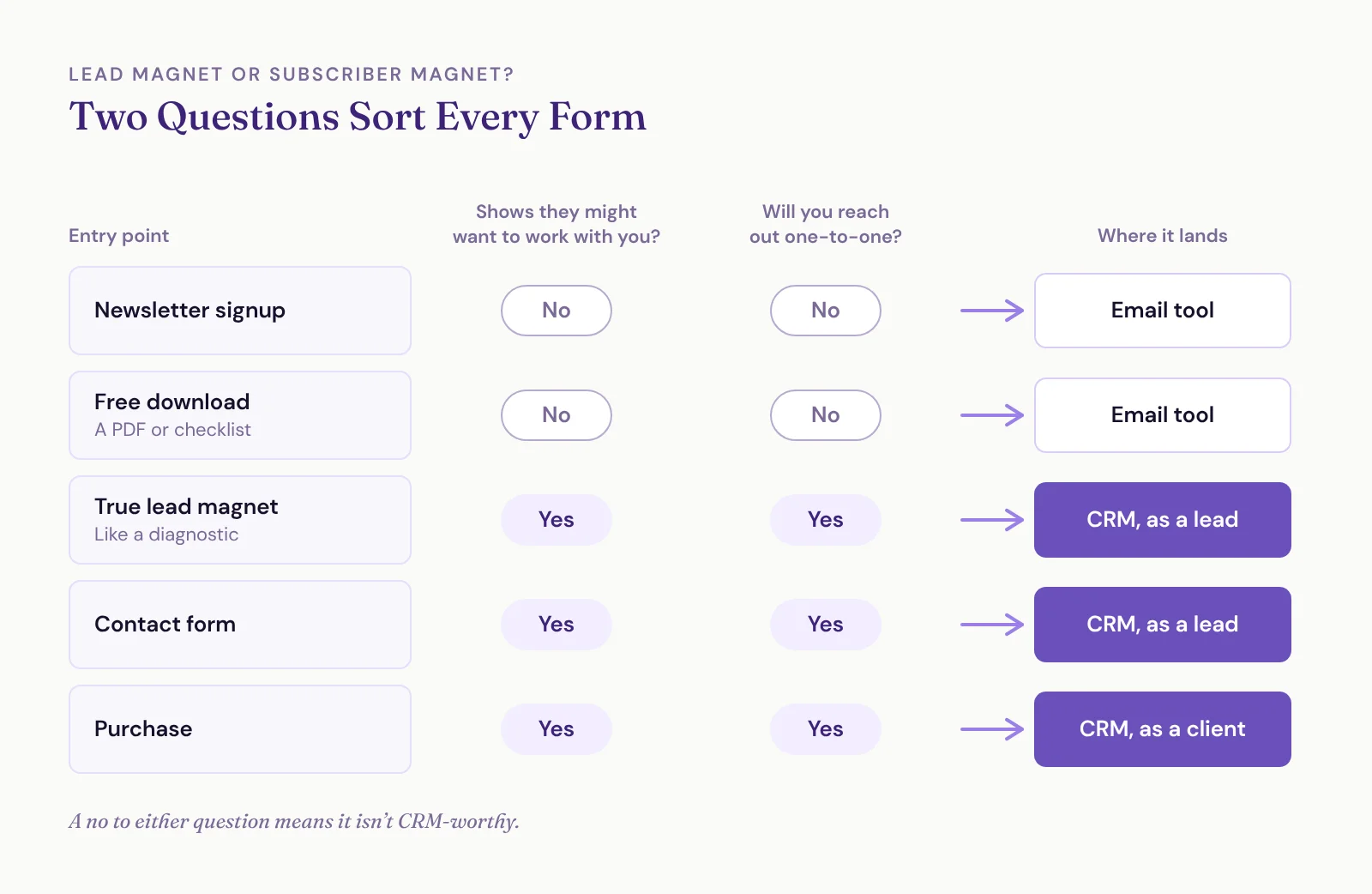
If the answer to either one is no, it's not CRM-worthy. Run your forms through those and they usually sort like this:
Newsletter signup: email tool.
Free download: email tool, unless it qualifies people the way a diagnostic does.
Contact form: CRM, as a lead.
Purchase: CRM, as a client with the deal attached.
Cadences Are One-to-One. Campaigns Are One-to-Many.
Your CRM connects straight to your email inbox. Sending an email from your CRM is the same as sending it from your inbox. When the CRM sends a series of those to a lead, automatically or as tasks you send yourself, that's a cadence.
Campaigns (your newsletter, your welcome series) go out through an email marketing tool's bulk sending servers. Every email marketing tool works this way. You authenticate your domain, which tells inboxes the tool is allowed to send on your behalf.
So cadences are one-to-one emails, and campaigns are one-to-many emails.
You want to follow up with leads automatically, but your inbox can only send so much. Google Workspace caps you at 2,000 emails a day. If you've got a big list, there's no way you could send your newsletter through your main inbox. You wouldn't want to, either. That's how you wreck your deliverability.
What Happens When You Blend the Two?
Some CRMs, like HubSpot, try to hold sales and marketing in one database. Everybody goes in, subscriber or lead. Then you need complex workflows to label who counts as a marketing contact and who doesn't, and you have to stay really on top of lifecycle stages to keep it straight. Only marketing contacts get your marketing emails, and they're also what you pay for.
Here's what that looks like in real life. A client came to us from an all-in-one tool. Their list held 4,251 people. Their newsletter was going to about 800 of them. Between contacts flagged as non-marketing and the tool's own suppression rules, everyone else was quietly getting skipped.
Other all-in-one tools have their own catch. Some don't allow cold outreach at all, which is a problem when your sales CRM is supposed to hold your prospects.
Every blended setup we've inherited ends up a mess for the client long term. It's a big reason we build every client a separate sales CRM and email marketing tool.
Why Not Just Sync Everything?
The functionality is there. Most tools will happily push every CRM contact onto your list and every subscriber into your CRM. Don't let them.
Cold leads are the clearest reason. Putting a cold prospect in your sales CRM is fine. Adding them to your newsletter when they never opted in breaks the rules of every email marketing tool I know of and, depending on where they live, the law.
Going from CRM to newsletter, here's who you leave off:
Someone who came in through your contact form and didn't check the newsletter box.
Cold leads.
Busy decision makers at large companies, unless they tell you they want in.
If you want those people on your list, build a habit of asking them. The best moments are when they buy and while you're working together. I walk through which newsletter adds to automate and which to leave as a checkbox in another post.
Some people in your CRM will end up on your list, and some subscribers will end up in your CRM. Every crossing should be on purpose.
"But I Want Everything in One Place"
When I explain all this, the pushback usually comes in two flavors.
"My CRM charges by contact count." Sales CRMs generally don't. Email marketing tools do, which is one more reason your list should hold only real subscribers, not fluff from your sales CRM. The email tool we set up for clients is generous about it: 5,000 contacts for every paid user license, so two users get 10,000 and three get 15,000, with unlimited sending. The sales CRM side has functionally no limit. If your sales CRM charges you per contact, we should probably talk.
"I want to see their opens in one place," or "I'll lose their data." You won't. Their results live in your email tool, and you can still find them. If you really want opens next to the CRM record, we can make that happen with some savvy integrations. Not a big deal.
I'll level with you, though. The most broke speakers, thought leaders and business owners I know get hung up on these fine details. It's an escape from focusing on the stuff that actually makes money.