Your system's job is to remind you. Your job is to show up.
My business partner Austin put it in six words: automate the trigger, not the touch. The trigger is the reminder that it's time to reach out. The touch is the message itself. For the people who matter most to your business, the system handles the first one and you handle the second.
Most speakers flip that around. They ask us to automate the email, when what they actually needed was a tap on the shoulder.
The Client Who Told Austin He Built the Wrong Half
Austin tells this one in his Soapbox newsletter. A client asked him to automate her pre-event coordination email, the one that goes out before every gig. So he built it.
Then she told him what was really going on. Sending the email was easy, and she'd be happy to personalize it. "I'm more worried about forgetting to do it in the first place."
He'd automated the wrong half.
I hear some version of this all the time. Recently I was on a call with someone who said the exact same thing. Writing the email takes a few minutes. Remembering to send it is where it falls apart.
And the personal part is usually tiny. Austin's examples are things like the venue changed, or the organizer's kid just started college, or they're nervous about the CEO being in the room. That's a 30-second line. It's also the line no automation can write for you.
Why Everyone Assumes "More Automatic" Is the Upgrade
People ask for automation because they feel like they don't have time to reach out to their past clients. I get that.
Everything comes with a cost, though. When you automate the touch to a past client, the message has to be vague. Think about it. What could you possibly say to every past client at once that gets them into another conversation? "Hey, let's do another speaking thing"? That's about as specific as an automated email can get.
Now compare that to an email you send yourself:
It was so awesome working with you. I remember laughing over the cocktail table when [that thing happened]. I was thinking about it earlier today and wanted to say hey. While I'm here, are you doing anything in the future where we could get together and I could help your team with [X]? I remember you mentioning that was a pain point last time.
That level of outreach is way more likely to get a response. So automating the touch costs you twice. The message gets vague, and the conversion rate drops right along with it.
Merge fields don't save you here either. Early in my career I went overboard with custom fields for things like birthdays and star signs. What actually mattered was timing and reminding people what I do. The cocktail-table moment isn't sitting in a field anywhere. It's in your head, and the system's job is to make you go get it.
There's another trap. A lot of people want to jump straight into automating. If you don't have a process that's been proven to work, and you don't know it backwards, forwards and sideways, there's nothing to automate yet.
Three Tractors and a Ladder
Austin explains the tiers of automation with tractors.
The hand plough. Your own effort and memory. Think of a wall of Post-it notes.
Construction equipment. Real leverage, but it still takes someone skilled to operate it.
Robot farm equipment. No operator at all, just "a nerd in the barn" programming it.
His punchline is "Nobody automated the farmer."
The tractors show you what the tiers look like. What I get asked on calls is when you get to move up a tier. That's the ladder.
Do it by hand for a while. Prove the touch works and learn what people respond to.
Make it easy. Keep it a task, but drop in an email template you customize each time.
Automate it once it's boring. When you're sending the same thing over and over, it's working, and you catch yourself asking why you're still doing it manually, that's the sign.
By that point you've got a process that's documented and proven. Then it can be automated.
It's a lot like flying a plane. Autopilot is great. But just because you've started flying doesn't mean you get to switch it on. You fly by hand for a while and learn the mechanics, and then automation can assist you.
What Should You Automate, and What Should Stay Personal?
As a rule of thumb, you want the system reminding you to do the things that need a human being. Where that line sits depends on where your business is.
Early on, personalize everything. You care the most about these relationships, and it's the smallest number of them you'll ever have in your database. Pay attention to every touch.
Your email subscribers don't each need a personal note. They do need content that's relevant to them. (A subscriber isn't a lead yet, and that's fine.)
Leads who ghosted you get a light touch. Don't write them off forever. Maybe once a quarter you send them all a single email that's relevant to your ideal client, to reactivate a few. One catch. You can't drop people onto your email list if they never opted in. If they came in through your inquiry form, you've got implicit opt-in. If they're truly cold, email them from your CRM instead.
Your highest-value relationships stay personal. Past clients. The leads you're really excited about. The dream companies you found online and went after by hand. Those touches deserve to be taken very seriously, and it's what making a single touchpoint as valuable as humanly possible looks like in practice.
As your database grows, the math shifts a little. If you're dealing with thousands of past clients, maybe 90% of them get an automatic touch. Even then, the 10% who are your highest-value relationships should hear from you directly. There should always be a segment of your database that says "these are the people I want to love on."
Here's how that plays out across the client lifecycle.
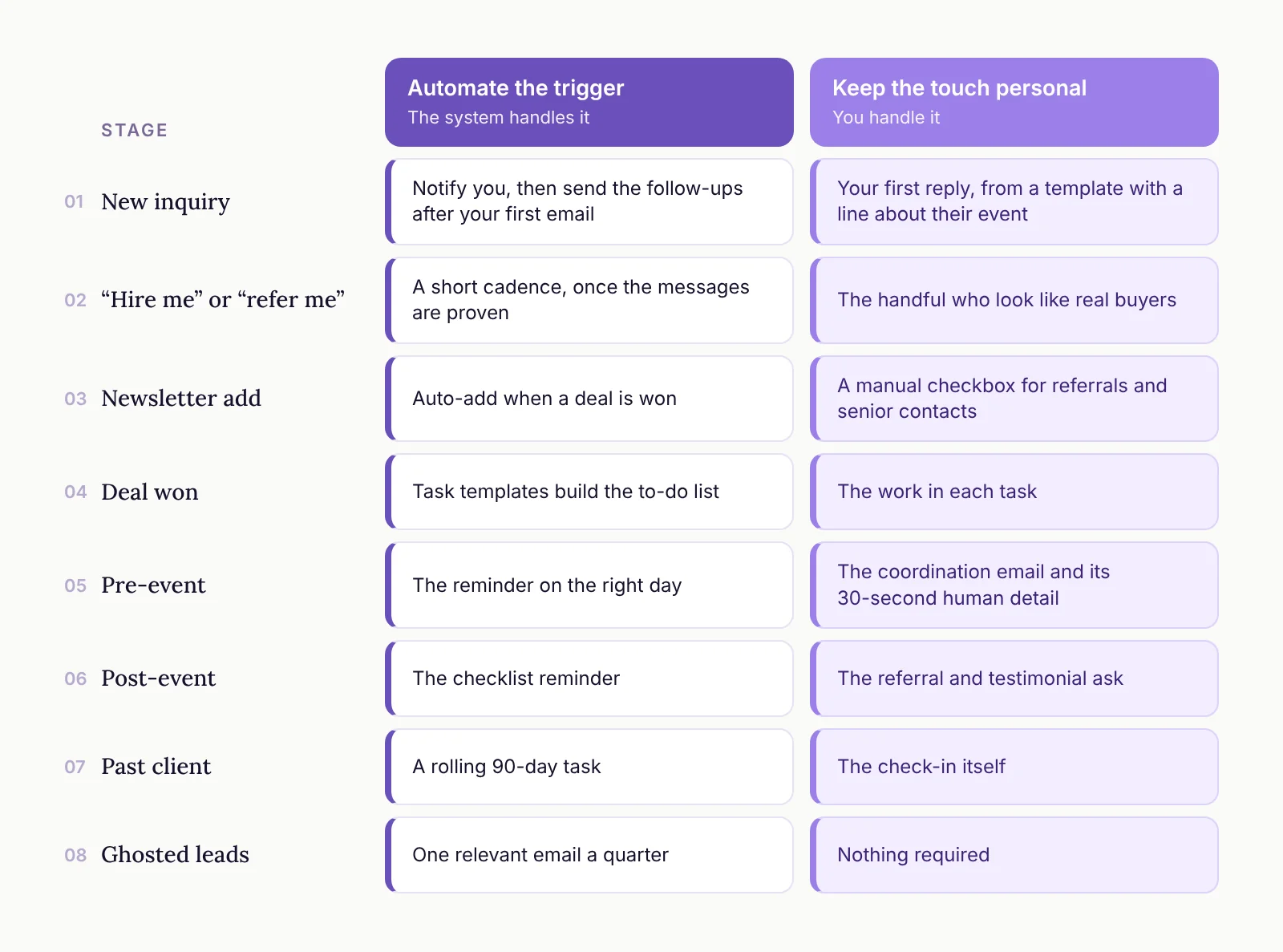
New inquiry. Trigger: a notification to you, plus the follow-ups after your first email. Touch: the first reply, from a template with a line about their event.
"Hire me" or "refer me" from a feedback form. Trigger: a short cadence, once you've proven the messages. Touch: the handful who look like real buyers.
Newsletter add. Trigger: auto-add when a deal is won. Touch: a manual checkbox for referrals and senior contacts.
Deal won. Trigger: task templates that build the to-do list. Touch: the work in each task.
Pre-event. Trigger: the reminder on the right day. Touch: the coordination email and its 30-second human detail.
Post-event. Trigger: the checklist reminder. Touch: the referral and testimonial ask.
Past client. Trigger: a rolling 90-day task. Touch: the check-in itself.
Ghosted leads. Trigger: one relevant email a quarter. Touch: nothing required.
The post-event ask has its own playbook, and you'll find it in Referrals Drive Two-Thirds of Bookings. Here's How to Ask after Every Gig. The pre-event and post-event touches are also where a lot of repeat bookings get won or lost.
How the Rolling 90-Day Check-In Works
This is the clearest example of the whole idea, so here's exactly how we set it up.
Ninety days after an event is over, a follow-up task shows up for that client. When you complete it, the next one is scheduled 90 days out. There's always a rolling check-in waiting, and it never sends anything on its own. Anytime we create a task, it's you doing something manually.
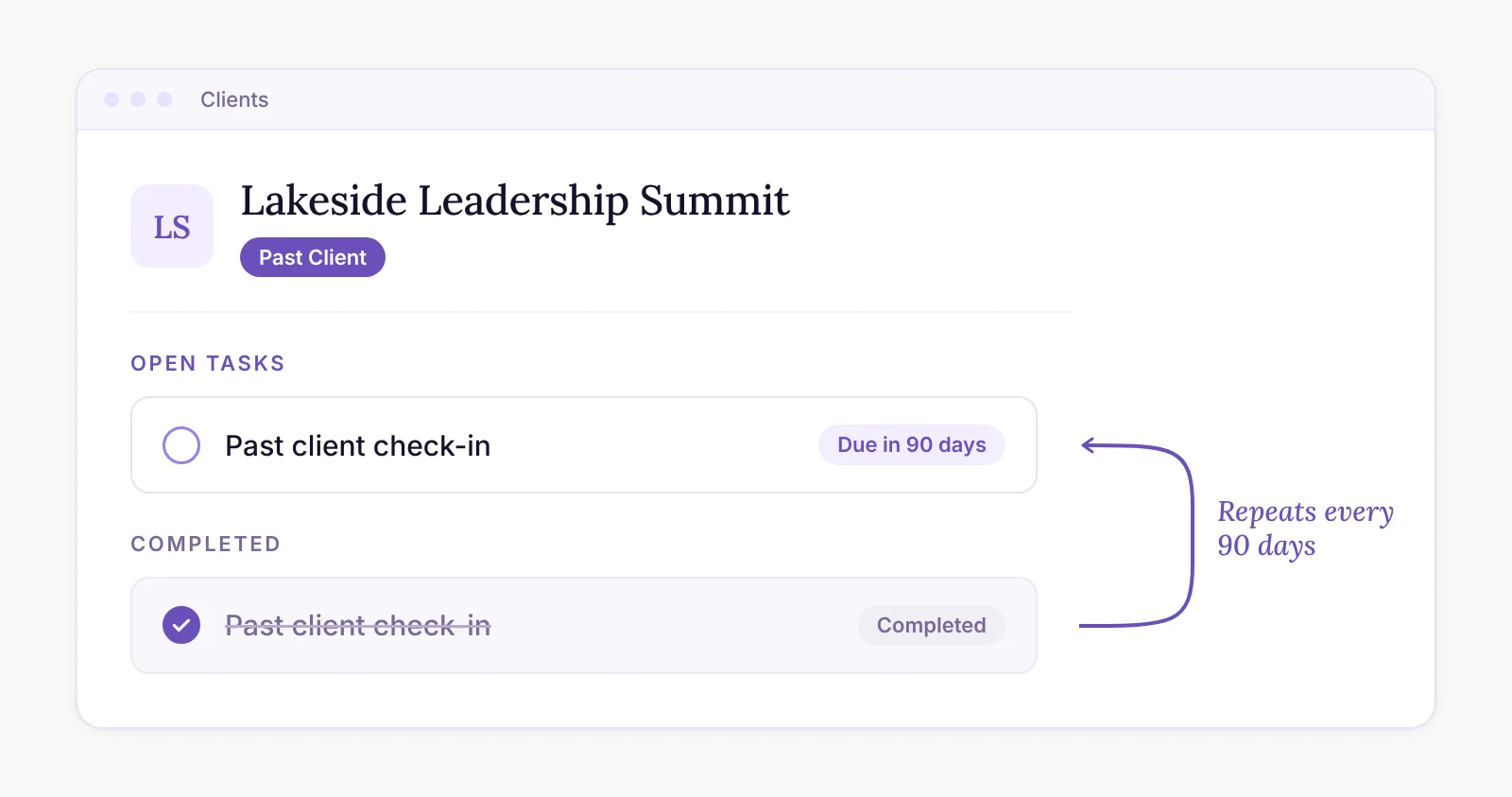
Worst case, the task pops up and you're not feeling it. Mark it complete and catch them next time.
We once worked with a team that had already built past-client follow-ups as fixed tasks at 90, 180, 270 and 360 days, for keynote clients only. We swapped all of that for one rolling 90-day task that fires when a client is marked complete. Their first question was whether the task sends the email. It doesn't. The person writes it. That's the point.
Start at 90 days. That's where we recommend everyone begins.
The numbers back this up. In our 2026 State of the Industry report, speakers who run their follow-up on automated workflows average $455K in revenue. Follow-up managed by a VA comes in at $384K, and manual follow-up or mental notes at $166K. The way I read that, those are the people who automated the trigger. They get reminded to follow up every single time.
If you want help with the writing, use your favorite AI tool connected to your CRM to draft the check-in from the client's record. You can even have it slip in a joke. There's more on that in AI for Operations First, Content Second: Inside the $74K Revenue Gap. And if your reminders live in a CRM you never open, that's a different problem worth fixing first.
"I Don't Have Time to Write 30 Personal Emails"
I hear this one a lot. My answer works like a flow chart.
Are you broke, or do you need to make more money? If yes, this is worth your time. You need to reframe how you think about time, because these are the people most likely to reply and book again.
If you're already making plenty and you truly don't have the time, okay, fine. Let's figure out where automation makes the most sense, because something is better than nothing.
Automating some outreach really can help when you've got lots of business coming in and you just need to maintain what you have. It also makes sense for lower-value leads. A lot of speakers have a post-event feedback form with a question like "I'm interested in hiring you, referring you, or getting your newsletter." We've found the hire and refer leads from that form tend to be lower quality, and you get a lot of them. A short cadence works well there: "Hey, you said you wanted to chat, let's do that," and a couple of nudges after it. Even then, maybe 10% of those people deserve a personal note. Why Nobody Replies When Attendees Say "Hire Me" (and the Four-Email Fix) goes deeper on that one.
Austin's version of this rule is about price. Automate the touch on something cheap. Once you're talking about a $25,000 keynote, the touches that win it should come from you.
He ends his newsletter with a line I can't beat, so I'll borrow it.
Your system should be the one with the good memory. You should be the one with the personality.