I used AI to help write this post. For a piece about why content shouldn't be the first job you hand AI, that's a little ironic.
It also proves the point. This post didn't come from a prompt typed into a blank chat. It came out of a system we built first: a voice guide trained on years of my own call transcripts, emails and writing, a board that tracks the topics real buyers keep raising, and an interview step where I answer questions on video before a single paragraph gets drafted. A lot of effort went into that process. It does buy back time now. But it's an operational system, and the content is just what comes out the other end.
Most speakers skip the system and go straight to the content. That's backwards.
The best use of AI in a speaking or consulting business is anything operational that removes administrative friction. Get your tools connected, hand AI your daily routines, let it knock out tasks. Then layer content on top once you've learned how the thing actually works.
What the $74K Gap Actually Measures
Our 2026 SSI report surveyed 216 speakers across 13 countries. One question asked whether AI had actually reduced their work hours, or just increased their content volume.
41% said it reduced their hours. 59% said it just gave them more content.
The people whose hours went down averaged $356K in 2025 revenue. The people who just got more content averaged $282K. That's a $74K gap.
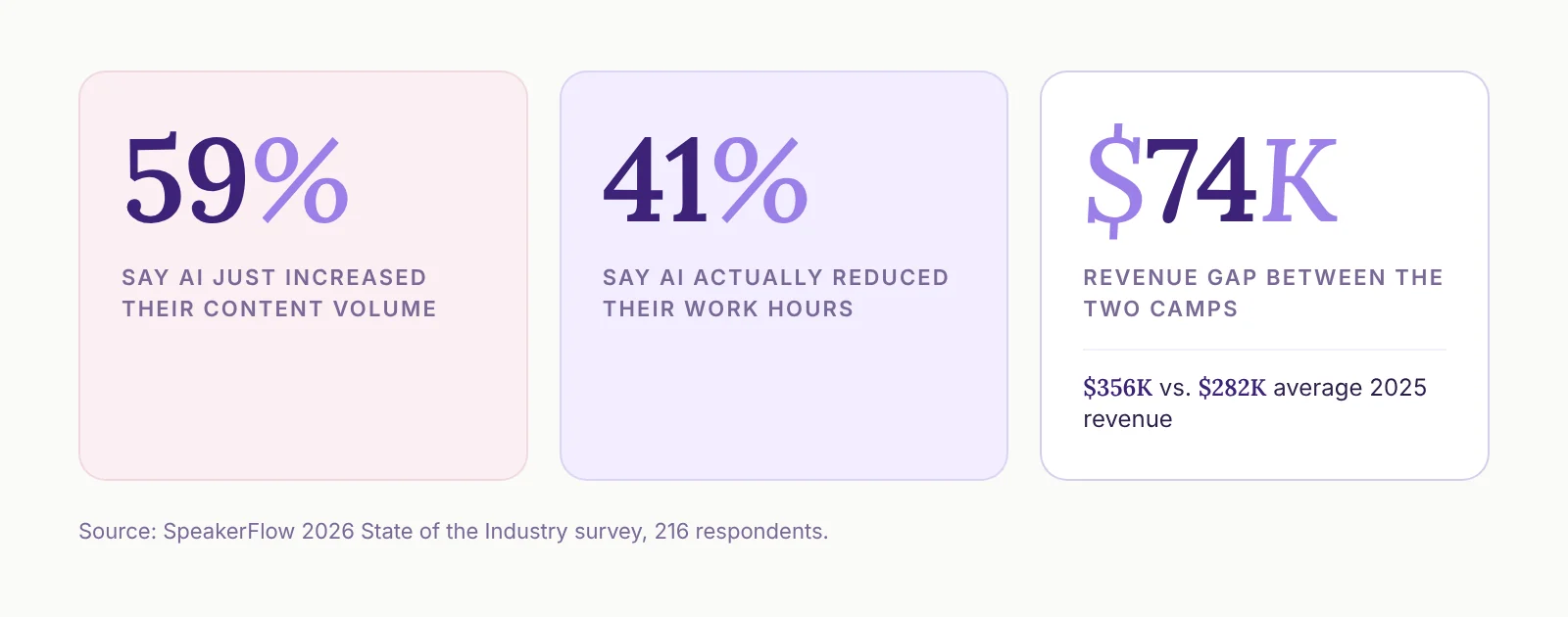
One honest note on how to read that. The survey grouped people by what AI did for them. It didn't ask what they pointed it at. Our read is that the hours-reducers are the ones using AI for operations, because operations is where the hours live. A tool that writes more LinkedIn posts gives you more LinkedIn posts. It doesn't give you your Tuesday afternoon back.
The survey's write-ins say it better than we can. One respondent said they'd used AI for social media "but don't very often anymore because it all sounds like the same slop." Another said, "Nothing I am getting out is good enough quality with enough consistency to make automation safe where my personal brand is involved."
Those people aren't wrong about the output. They're just starting in the wrong place.
Why Content Is Where Everyone Starts (and Stalls)
Content is the most visible thing AI can do, so it's where everybody goes first. You type a prompt, a post comes back, it feels like magic for about a week.
Then it all starts to sound the same. Information on its own is getting cheap fast, which is a big part of why the age of the informational speaker is over.
The real mistake is expecting AI to sound like you without giving it the skills and resources to learn how you sound. Look at how much we built just to interview and write blog posts. Most people don't want to slow down long enough to build that. They throw junk in, expect magic and end up with AI slop.
So they decide AI isn't that useful. Meanwhile, it's powerful enough to replace the need for a hire and free up your time in ways that are hard to picture until you see it.
Start on the operational side. You'll learn how AI actually works, and you can build the content system later on top of what you learned.
AI Is Only as Good as the Data It Has
This is true across the board. Your AI tool can only help with what it can see.
CRMs mattered a decade ago, back when AI wasn't even on the horizon, because a CRM gives you context for everything. Now that context is fuel. The businesses that separate from the pack, the ones that outperform and make a ton of money, are the ones that had their data in place in the first place. Their competitors won't be able to keep up.
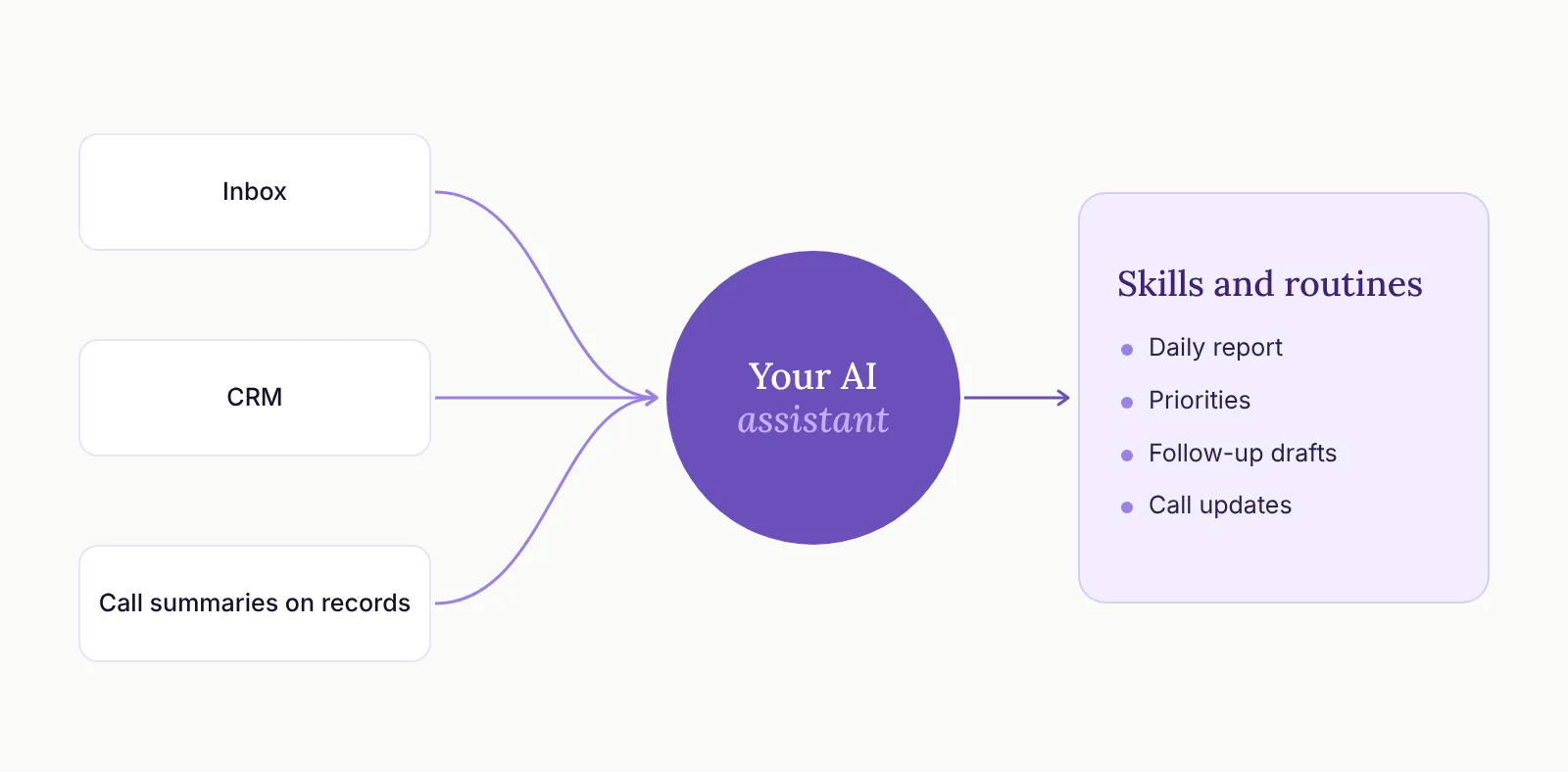
So the foundation isn't a prompt. It looks like this:
Your inbox can connect to your AI tool. Whatever you use as your AI hub, Claude or ChatGPT, it should be able to read the email you actually live in.
Your CRM is up to date and can connect too. Contacts, deals, notes and tasks, all current.
Your call notes land in the CRM. If you use an AI note-taker like Fathom, the call summaries should end up on the right records, and your AI tool should be able to read them.
You build skills and routines for the repeat work. Once the tools are connected and current, you write down the things you do every week and turn them into skills or scheduled routines. Then you keep layering from there.
Step two is where most people fall down, and it's a habit problem more than a software problem. I dug into that in Why You Bought a CRM and Still Live in Spreadsheets, and the specific habits that keep a CRM useful are in Do You Need a Better CRM or Better Habits?
Keep those habits and AI has something real to work with. Skip them and it's guessing.
Five Back-Office Jobs to Hand AI First
None of these are flashy. That's the point. Each one takes a chunk of admin off your plate every single day.
1. Clean Up the Inbox and Hand You a Daily Report
AI can automatically archive the emails you don't need to see and give you a short report on what's left. You start the day with the things that matter instead of digging for them.
2. Tell You What to Do Today
This one removes a lot of the guesswork. AI looks across your task lists, your calendar and your inbox and helps you prioritize the day.
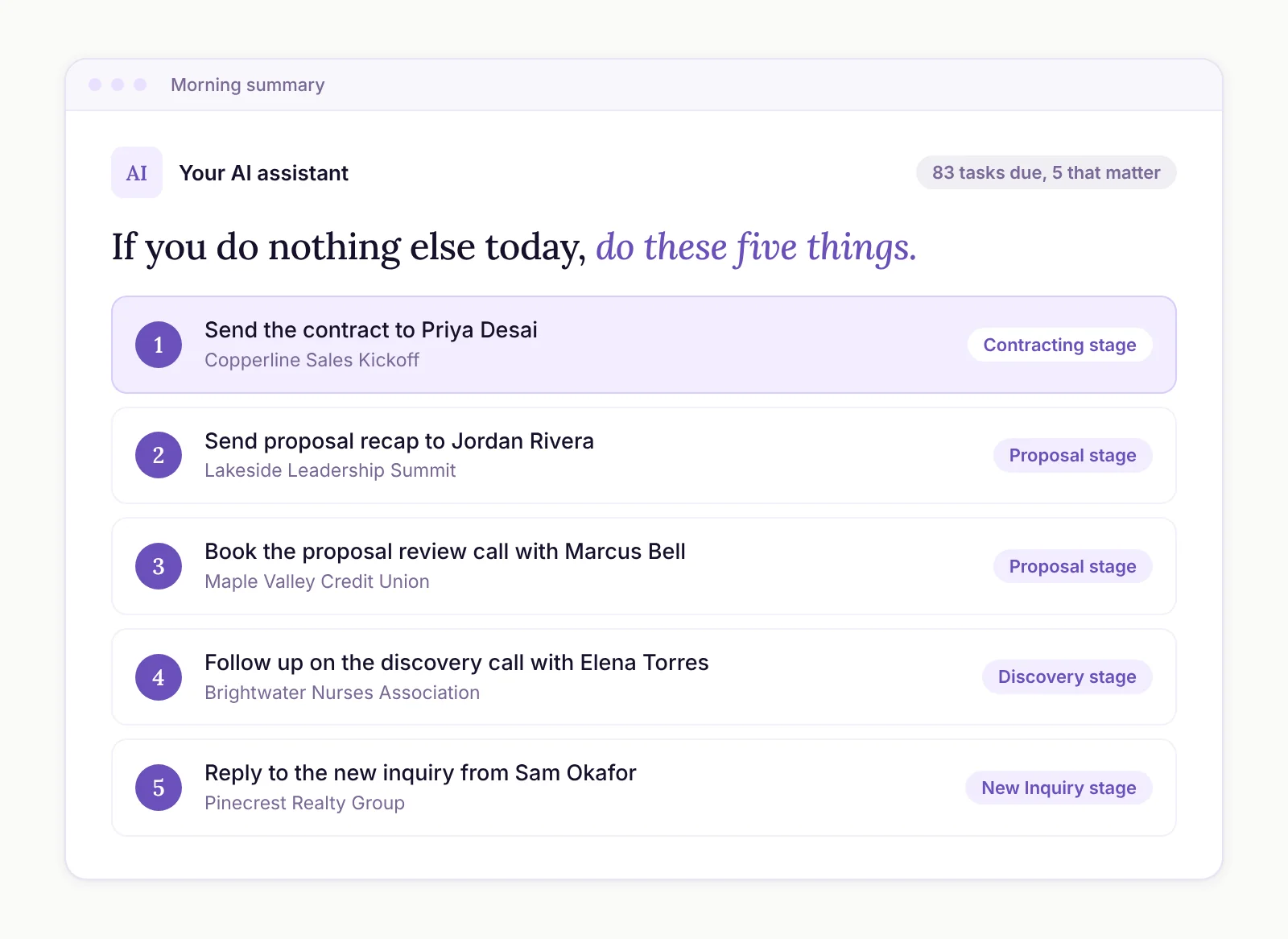
I run a routine every morning that does this against the CRM. When I walked a client through it in October, I had 83 tasks due or overdue. The routine ranks the deal tasks by pipeline stage and boils it down to one instruction: "If you do nothing else today in the CRM, you need to do these five things."
3. Draft the Follow-Ups
For the lower-priority follow-ups, AI reads the email history and the notes on the record, including call summaries that attach automatically, and drafts the email.
It writes in my voice, too, because I had it run through my inbox over the last 10 years. I review the drafts and approve them in bulk. It now takes me 30 minutes, maybe tops, to knock out those 83 tasks.
The same idea works for past clients. On the podcast, Austin talked about having Claude dig through emails and meeting transcripts before reaching back out to past clients, so the message mentions the thing you'd forgotten they told you.
4. Turn Calls into Updates
Austin built a skill that runs after a client launch call. It posts the project status and the tasks, then drafts the client email for him to review.
That used to take him 30 to 60 minutes after every launch call. Now it's about three. It only works because the call summary is already sitting on the record.
5. Load the History You Never Got Around To
Plenty of businesses have years of past contracts sitting in a folder, never entered into the CRM. AI can work through them for you: create the contact, account and deal for each one, check for duplicates, attach the contract and add a note.
Start with one at a time and make sure it does the job well before you hand it the whole folder.
Once it does, let it run. I did this for a client of five years with 800 contracts going back to 2007. Claude created the deal, contact and account for each one, attached the contract and wrote a note. It ran on autopilot for four days straight.
Once that history is in, every other job on this list gets smarter, because AI finally knows who your past clients are.
Then Build the Content System
Once the operational side is running, content is a fair next step. Just build it the same way.
That's the system I described at the top. The voice guide is what makes drafts sound like me. The interview is what makes sure the ideas and stories are mine, with AI handling the shaping.
That's more work up front than a prompt. It's also the difference between content people want to read and the same slop everyone else is posting.
AI is great at turning your thinking into a draft. It still needs your thinking. Keep the judgment calls with people, and keep an eye out for an AI that agrees with everything you say.
The Pushback We Hear Most
"It's going to cost more the more we use it." That's true. It's still less than a human being, and it's buying back your time. So the real question is how much your time is worth. Start on the basic plan and hit its limits before you upgrade.
"What can I safely put into it?" A lot of people are nervous about connecting their apps to an AI tool. Honestly, I'd work on removing that fear. You can turn on data backups in case something goes wrong. And I'd rather be on the cutting edge, learning fast, than behind everybody else.
The one place I'd slow down is regulated data. If you work with health records or other regulated data, keep that data out of AI tools by default. Before you connect AI to it, check with whoever handles your compliance whether your AI plan's terms cover that kind of data. When in doubt, strip out names and identifying details before anything goes in.
"Where do I find the time?" It's the same issue as any piece of technology. In the sea of your day-to-day, setup time is hard to find. The answer is to slow down once, on purpose, and figure out which routines to hand off. You can do a lot more with AI than you think. You just have to stop long enough to set it up.
And if you'd rather not do that stuff yourself, that's what we're here for.