You bought the CRM. Maybe you even paid someone to set it up and sat through the training calls. And you still open a spreadsheet every morning.
The short answer is that behavioral change is hard, and it only sticks when the new way pays off fast. Out of the box, a CRM doesn't pay off fast. It asks you to put more in than you get back, so you go back to the thing that already works.
We've done about 2,000 implementations at SpeakerFlow, and I see this all the time. Here's why it happens and what actually makes the spreadsheet go away.
Why Does the Spreadsheet Keep Winning?
Spreadsheets have been around since VisiCalc showed up in 1979. Everybody knows how one works.
They're also wildly flexible. Change the colors, add a tab, rename a column, highlight the rows you're worried about. It's basically a whiteboard that does math, and you can make it look the way you think.
A CRM has none of that going for it. There's no universal standard for how one looks or behaves, so every one feels a little foreign at first.
And out of the box, it isn't built for you. The hairdresser, the roofer and the speaker can all buy the exact same CRM. Before it helps any of them, somebody has to:
customize it to the business model
set up the email deliverability records
build views that match how you actually work
make it look decent enough that you want to open it
That assumes you've got the time, the interest and the technical chops to do all of it. Most people have the chops for a spreadsheet. Far fewer have them for a CRM.
So the math goes like this. If what you put into the CRM is more than what you get out of it, you'll go back to your old ways. The juice just isn't worth the squeeze.
Whose Fault Is It?
When a CRM doesn't stick, people usually blame one of two things: themselves ("I'm a creature of habit") or the software.
Honestly, fault is the wrong word. It's an expectation mismatch.
Software companies have done a pretty terrible job here. The marketing says you can sign up, log in and watch it run your business with zero setup. We've all been sold that, and CRMs might be the worst offenders.
Buyers bring their own version too. Plenty of people are technical enough to be dangerous, so they figure they'll set it up themselves over a weekend. Then it won't do what they want, and they feel like they were lied to.
Nobody's crazy here. The expectation was off from the start.
When the CRM Doesn't Stick
A speaker came to us using HubSpot. He'd hired a consultant to set it up for him, then did coaching calls with her alongside his VA. By his own guess, he was using maybe 15 to 20% of it.
The rest of his business lived in spreadsheets. He wanted to see his leads by event, one tab per talk, and he couldn't get that view in the CRM. So his VA pulled every new lead out of the CRM and pasted it into the right tab.
When attendees checked the box saying they wanted to talk about booking him, his team sent each one a personal email by hand from Gmail. Those emails got zero replies. He was pouring time into his warmest leads, getting nothing back, and felt like he needed permission to stop.
The CRM did exactly one job for him: tracking holds and deals. Even his monthly revenue review ran off a spreadsheet.
None of that was laziness. The CRM got set up as a CRM, and the rest of his business (the forms, the follow-up, the reporting) never got connected to it. So the spreadsheet stayed where the real work happened.
Here's what we set up for his launch:
One form for every talk, with a hidden event name field. Before each talk, someone updates that field. It's about a two-second job, and every lead gets tagged with the right event on its own.
His Gmail connected straight to the CRM, with open and click tracking built in.
A short automated email cadence for anyone who checks a box. If they don't reply, they move to his newsletter.
His spreadsheet data migrated in the day before launch, so there's nothing to go back to.
When you've got a team that understands your business model and has thousands of examples to pull from for whatever comes up, and your system gets built around the way you want to work, the piecemeal way of running things fades away. You start to realize you can't imagine going back.
What Actually Makes the Spreadsheet Go Away
Adoption happens fast when the system is customized twice. First to your business model, so it already knows what a speaking inquiry, a hold or a bureau deal is. Then to you: how you work, how you see things and how you think.
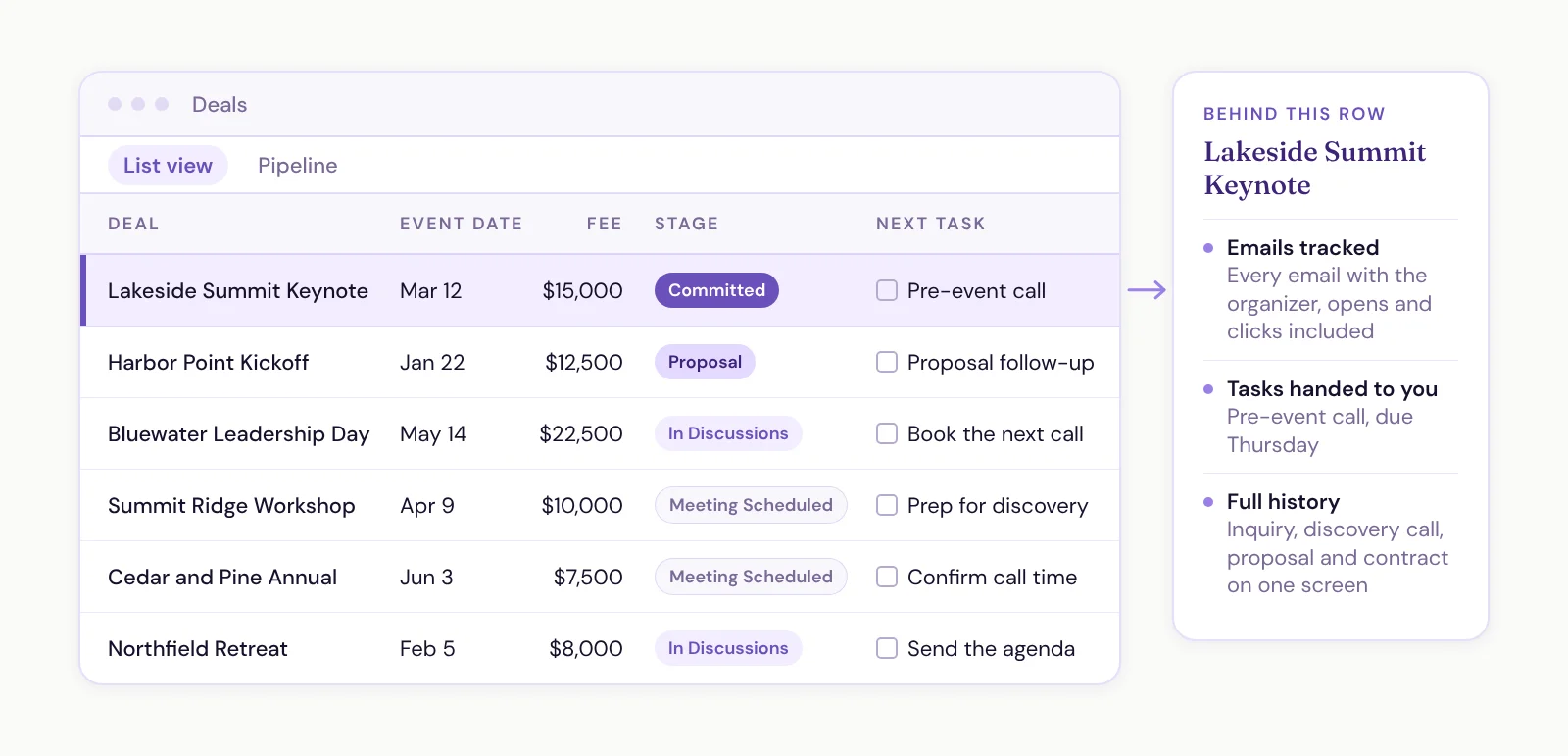
When both are true, the CRM starts doing things a spreadsheet can't. It tracks your emails. It hands you your tasks. It shows someone's full history on one screen.
That's the whole job of an implementation. We run ours in three steps:
Consolidate. We dig into everything you use now, spreadsheets included, and build a first version of the system around it. You keep using your spreadsheet while we build. The day before launch, we migrate everything in.
Automate. You launch with your data already there. Then we spend the biggest chunk of our time together, usually about 90 days, training you, answering questions and automating the mundane stuff.
Flow State. This one's more of an outcome. The things that used to be manual, or just didn't work, are now working for you.
The goal every time is the same. The day you launch, you don't need the spreadsheet anymore. We've watched that happen time and time again.
A CRM Isn't a Fancier Spreadsheet
This is the trap a lot of spreadsheet people fall into after they switch. They treat the CRM like a spreadsheet, so it turns into a static database. Somebody updates rows. Nothing moves.
A CRM should have a current to it. People are always moving through it:
A new lead comes in. You reach out. You connect, or they tell you it's bad timing, or you disqualify them.
They book a sales call, so there's money on the table. The lead becomes a deal, and the deal moves from meeting scheduled to in discussions to proposal to committed.
They become a client, and the tasks for delivering the gig show up on their own.
That's why "my VA can keep it updated" usually isn't enough by itself. A VA can absolutely handle the data entry. But first somebody has to write down the process: what gets updated, when, and what triggers it. Otherwise you've hired someone to maintain a spreadsheet with extra steps.
You Have to Be Fed Up First
I say this all the time, so I might as well say it here. A better system won't fix anything until you've had enough of the current way.
There's a moment where it hits. Opportunities are sitting there going stale. People are slipping through the cracks. The spreadsheet got so overwhelming that you stopped keeping it up, but you're scared to delete it, so you're stuck with it. A lot of people quit using the sheet altogether and run everything out of their inbox.
If that's where you are, good. That's when change actually starts, because now you're motivated to make it.