
Most people I talk to use ChatGPT or Claude every day. They have it rewrite an email, punch up a LinkedIn post or brainstorm a talk title. That's useful. It's also just a chatbot.
The question I hear on calls is the next one: how do I make it actually work for me?
The answer looks a lot like building systems in your business. You find the work that eats your time and follows the same steps every time, you write down the process, and you let it run. The difference is who's doing the running.
What's the Difference between a Chatbot and an Agent?
A chatbot waits for you. You type, it answers, and nothing happens until you type again.
An agent takes action. It works on things at set times or on its own, using schedules, routines and triggers to do the work for you instead of telling you how.
Anthropic, the company behind Claude, puts it in a similar way. In their words, agents are systems where AI directs its own process and tool use, instead of following a script one message at a time.
Here's what that looks like on a normal morning. I sit down at my desk, and the inbox is already cleaned out. The junk is archived. Replies to the easy stuff are drafted and waiting for me. My CRM tasks are sorted into what matters today and what can wait. It tells me what to do.
I didn't type a single prompt to get there.
Start with Work That's Manual and Prescriptive
The first step is noticing.
Look for work that takes a lot of your time and follows the same process over and over. "Prescriptive" is the word I use with clients. A few from my own week:
Accounting. Organizing the books, matching transactions, reconciling. Same steps every time.
Your inbox. Archiving the junk every morning and drafting replies to what's left.
Your CRM task list. Reviewing what's due and deciding what's worth following up on.
All of these are manual, and all of them follow rules you could write down. That's exactly what AI is good at.
The hard part is raising your awareness. Most of us do this stuff on autopilot and never stop to ask how AI could help with it. Once you start asking, you'll see it everywhere. (If you want a short list of where to begin, I covered five back-office jobs to hand AI first.)
How to Build an Agent, Step by Step
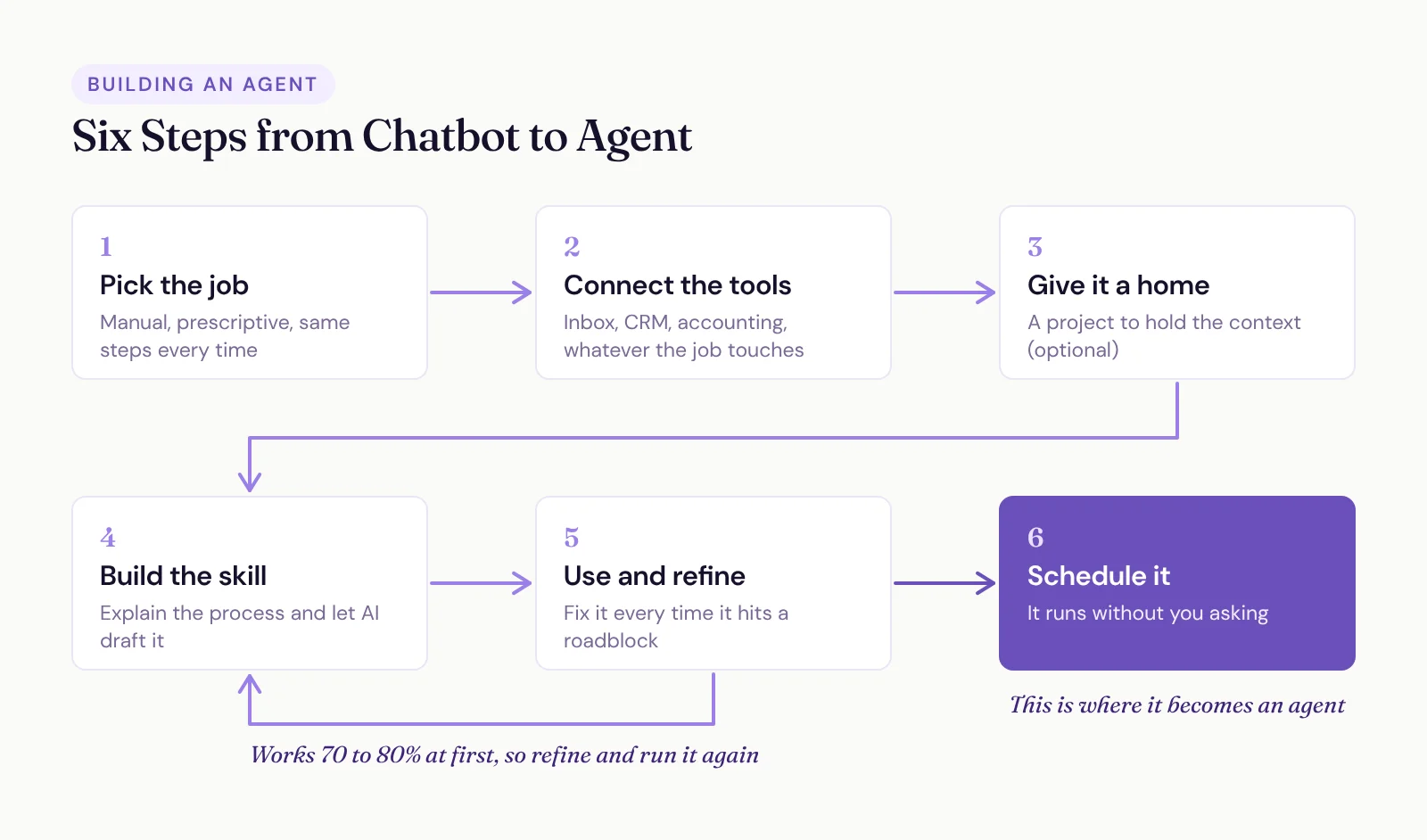
Here's the order I follow every time.
Pick the job. One manual, prescriptive thing you want off your plate.
Connect the tools. Your AI can only work with what it can reach. If the job lives in your inbox, your CRM and your accounting app, connect them. (Here's how connecting AI to your CRM works, and why it's safer than you'd think.)
Give it a home. I like to create a Claude project for each agent I build. It's optional, but it keeps all the context in one place while you refine it.
Build the skill. A skill is a written process your AI follows every time you ask for that kind of work. You don't have to write it yourself. Start a chat, explain step by step what you do for that task, and have the AI draft the skill.
Use it, then refine it. The first version usually only works 70 to 80% of the time. That's normal. Every time it hits a roadblock, fix the skill so it doesn't hit that one again.
Schedule it. Once it's reliable, set it up as a scheduled routine. I have a weekly one for accounting, a daily open every morning and a daily close at the end of the day.
That last step is the one that makes it agentic. Before it's scheduled, it's a really good chatbot. After, it shows up and does the work whether you remember to ask or not.
Here's a recent example. In about two hours, Claude categorized 180 Stripe transactions, built 40 journal entries for our payouts and wrote 30 custom scripts for a client's CRM. All of that would've taken me about two days.
What Goes in a Project's Instructions?
A client asked me this on a call recently: "When I start my Claude, is there something I need to say to make sure it goes there?"
If you set up a project, you say it once, in the project instructions, and every chat inside that project starts with it. Keep them short. Ours cover:
What the project is for, in a sentence or two.
Who you are and what your business does, so it isn't guessing.
Which tools and skills to use for this job, and which to leave alone.
The rules. Things like "draft emails, never send them" or "ask before changing anything in the CRM."
How to report back. A short summary, a list of decisions for you, whatever you'll actually read.
The skills and the schedule are what make it an agent. The project is a hub of context, so you're not re-explaining your business every time you open a new chat.
One Agent per Job
As you build more of these, give each job its own home.
We run a webmaster agent for the SpeakerFlow site. It pulls data from the website, recommends new blog topics based on what people search for and which pages they visit, flags issues in Google Search Console and reports back on what needs to happen. We've even let it make some of those updates on its own.
We also have a project for every client account we're working on, so all the history lives in one spot. Same for our content strategy and the other core roles in the business.
Splitting them up keeps each one focused. A separate agent per job burns through less context, and the work comes out more structured than one giant chat trying to do everything.
Once a few are running, you can layer up. One agent can orchestrate several skills, almost like a project manager handing out work. That's a later step. Start with one.
A Day with the Routines Running
Here's my day now, routine by routine.
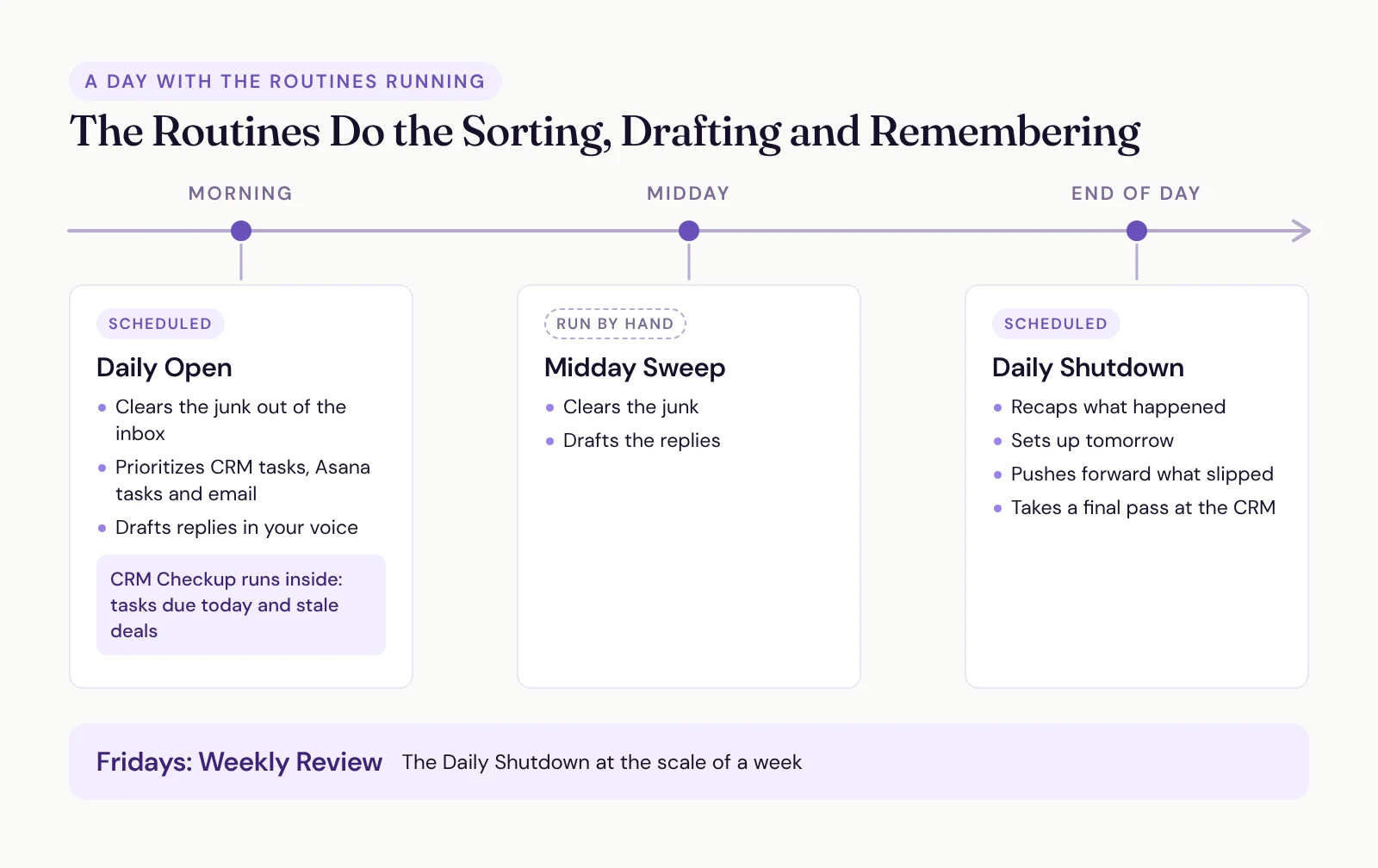
Daily Open. Clears the junk out of my inbox, reads my CRM tasks, my Asana tasks and the emails that are left, and tells me how to prioritize each one. It drafts replies to anything I've answered before, using my email history and a voice skill I built so the drafts sound like me.
CRM Checkup. Runs inside the Daily Open. It reviews the tasks due today and any deals that have gone stale, and keeps me honest about following up on time.
Midday Sweep. I run this one by hand when the inbox piles up in the middle of the day. Same idea: clear the junk, draft the replies.
Daily Shutdown. How I wind down. It recaps what happened, sets up tomorrow, pushes forward anything I didn't get to and takes a final pass at the CRM.
Weekly Review. The Daily Shutdown at the scale of a week. It runs on Fridays.
So what do I still do myself? I read, I edit, I approve, and I handle anything that needs a human. The routines do the sorting, the drafting and the remembering.
Yes, You'll Babysit It for a While
I'll level with you. I'm at my desk more than ever right now.
Your job shifts. You go from doing everything by hand and being terribly behind, to being on top of everything and managing a handful of agents. That second part takes time. I'm not clicking the buttons anymore, but I'm still sitting there making sure it gets the job done.
That's the babysitting phase, and everyone goes through it. It ends as the skills get refined to the point where nothing gets dropped.
It's also where most people fall down. Building the skills, refining them and polishing them in the sea of everyday life is a lot. It's the same reason SpeakerFlow exists for backend systems. Who has the time to figure all of this out and then keep refining it?
Here's the part nobody tells you, though. Even with the babysitting, I'm spending my time on things I always knew I should be doing and never had time for: a real social strategy, ads, new outreach, our quarterly reactivator campaigns. The agents took the admin. I got the growth work back.
You won't be on a beach. You'll be doing better work.
Where to Start This Week
Pick one manual, prescriptive job. Just one. Connect the tools it needs, build the skill with your AI and use it until it stops tripping.
Then schedule it and let it run.
It's easy to get lost tinkering with AI, and tinkering feels a lot more productive than it is. Finishing one agent beats starting five.
If you want a head start, grab a skill from our Claude skills library. Download it, upload it to Claude and adapt it to how you work.