Your post-talk feedback form has one job. Be as fast as humanly possible to fill out.
Everything else on the form has to earn its spot, because every extra question costs you responses from people sitting in a ballroom with their phone out and your next slide already up.
We've been building event feedback forms for speakers for ages, and the most common mistake hasn't changed. The form is too long.
What Is a Post-Talk Feedback Form Actually For?
For most speakers, the value isn't the social share graphic or the score. It's "Hey, do you want to hire me? And if not, do you want to be on my list?"
A lot of forms go the other direction. They ask 20 questions. Was this insightful? Was it impactful? Was it engaging? Was it exciting? Then they turn the answers into a graphic you can post.
I get the appeal. But look at who's sharing those graphics on LinkedIn. Every one I see shows a 99%-plus rating. Nobody posts the bad ones, so the graphic doesn't tell a meeting planner much.
Meanwhile, all those questions cost you the thing you actually came for: the people who raise their hand.
What Should a Post-Talk Feedback Form Ask?
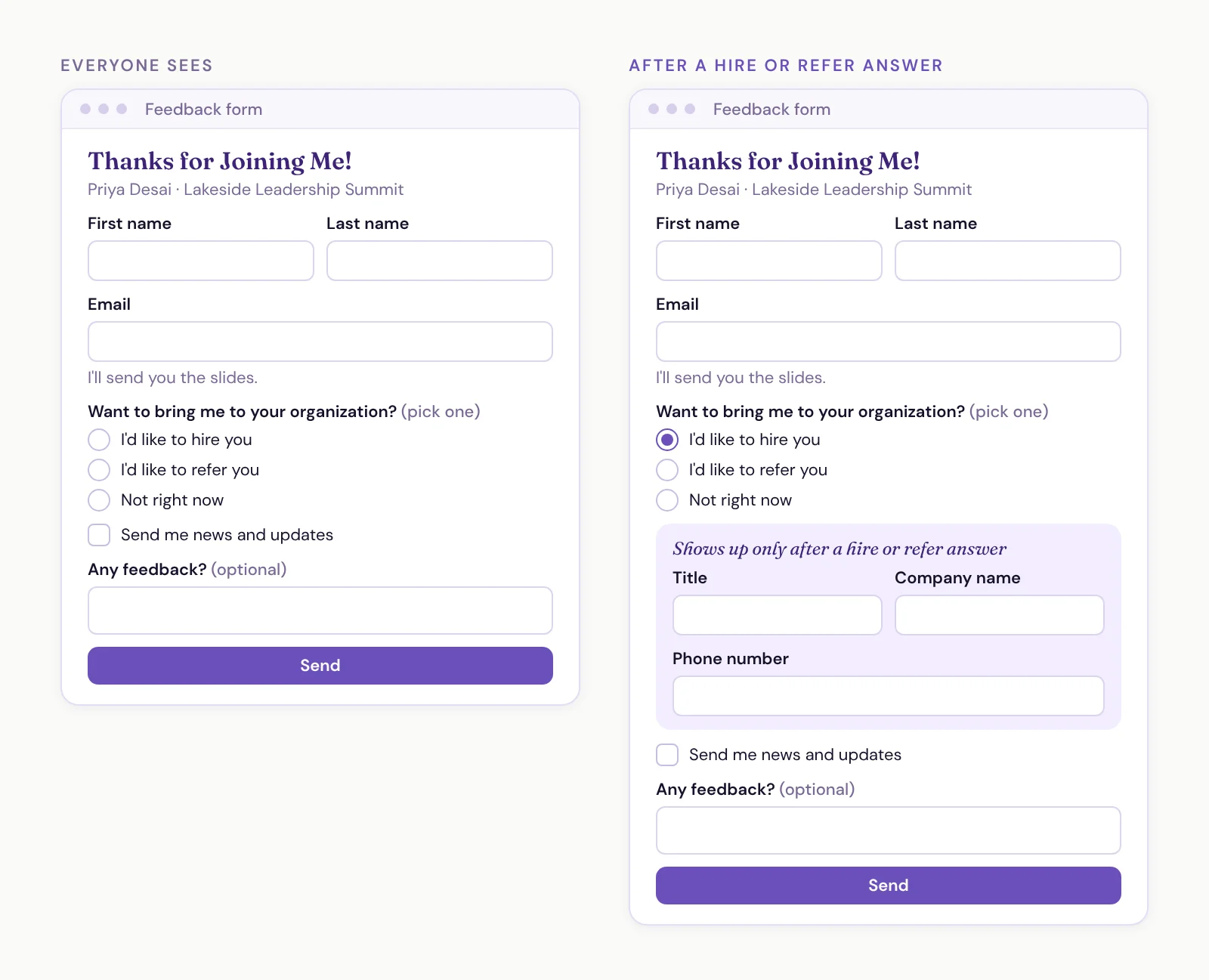
Here's the form I'd copy. It's dead simple:
First name
Last name
Email, with a line that says "I'll send you the slides." Update that email with each talk's slides before the event.
One question, "Want to bring me to your organization?" with one answer allowed: "I'd like to hire you," "I'd like to refer you" or "Not right now."
A separate checkbox: "Send me news and updates"
An optional open text box for any feedback, or anything they'd like to see next
That's the whole thing. One of our speaker clients runs a form this simple: name, email, the slides, what they're interested in and an optional feedback box. Over the last two years, his has been filled out more than 16,000 times.
Some people write long feedback in that box. A lot of people say they want to hire or refer him. Then the follow-up emails go out, which is a whole post on its own: Why Nobody Replies When Attendees Say "Hire Me" (and the Four-Email Fix).
With a simple custom form like this, I want to see north of 25% of the audience submit it.
The refer option is on there for a reason. It's the on-the-spot version of asking for referrals after every gig.
Ask Directly, and Make the Newsletter Its Own Choice
You'll see forms that ask "Would you like to chat?" with options like "Yes, soon," "Yes, but maybe in the future" and "No, but I know someone who might be." I don't recommend the in-between answers.
Just ask "Want to bring me to your organization?" and let them pick one: "I'd like to hire you," "I'd like to refer you" or "Not right now." One tap, and you know exactly what they want.
The newsletter gets its own checkbox, "Send me news and updates," as a separate decision. Someone who wants your emails isn't the same as someone who wants to hire you. A subscriber isn't a lead.
The hire and refer answers are the trigger for your follow-up. That's the part worth automating, so the right email goes out without you having to remember it.
Show Contact Fields Only after a Yes
Don't ask everyone for a company name or phone number. Most of the room will never hire you, and a long form makes them bail.
Use conditional fields instead. If someone picks hire or refer, the form shows three more:
Title
Company name
Phone number
Since they just picked one of those answers, they're pretty bought in. They'll happily fill out three more fields. And you get another way to reach them if email doesn't work.
What Should You Cut?
Anything that turns your feedback form into a full contact form. A few I've cut from client forms:
"Provide more details about this opportunity"
"What's your biggest challenge?"
"Keynote, workshop or virtual?"
All good questions. None of them belong on this form.
Find out if they want to hire you or refer you. Send them an email about getting on a call. Then cover the details on the call.
Should You Use Stars or Sliders?
Honestly, it doesn't really matter. Either one is fine.
I lean stars. People understand them without thinking, they're quicker to tap, and the conversion rate is higher. If you're going to ask for ratings at all, keep it to a few questions where people just press a button instead of typing something out.
Should Open Text Be Required?
No. A required open text box is where you get the biggest drop-off.
An optional one is great, and I'd encourage it for most speakers. The people who want to write you a paragraph will. Everyone else can skip it and still tell you they want to hire you.
When Should You Show the QR Code?
There are two plays here.
The first is to call the form out near the end of your talk, give the room two minutes to fill it out, then bring the energy back up. We talked through that approach on the best way to capture leads on stage.
The second is what a lot of higher-ticket speakers do. The QR code follows along on every slide, and the last slide is a call-out. It feels more polished, partly because the two-minute pause has picked up a reputation as a lower-ticket play.
The trade-off is that those speakers generally get fewer leads. If you go that route, go in knowing it.
Do You Still Need a Paid Feedback Tool?
Depends on what you want.
A paid feedback tool is easier to jump into. You don't have to think about which fields to include, how to word the questions or how the logic works. You'd still have to build your follow-up automations, but getting started is quicker. You also get things a homemade form doesn't give you out of the box: a shareable resource, social graphics and benchmarks.
If you don't have the technical know-how, the time or the desire to build your own, there's nothing wrong with that.
We're on the other side of the fence, though. It's better to own all of your data. If you have an operating system for your business, your form should be infinitely customizable, not bound to the limits of a tool built for the whole industry. And especially if you're a higher-ticket speaker, you want it fully branded. You don't want it to feel cheap.
That's why we keep seeing clients come to us from paid tools. They want a custom form because they can brand it, simplify it and trigger automations they fully control.
A form you own also opens up plays a feedback tool doesn't. One client sends people to leave a Google review right after they submit, with their feedback already captured. They're closing in on 1,000 Google reviews off the back of that form, on top of the booking and referral leads.
And the benchmarks? For clients who want reports, we have Claude connect to the form, pull everything and build the reports out. From there, they can chat with Claude to design exactly the report they want, then turn it into a skill so it comes out the same way every time.
So ask yourself what you want your audience to perceive you as. Then ask whether you need all the shiny objects, or just need people to tell you they want to hire you.
Keep a paid tool if:
You want to be up and running without building anything
The social graphics and benchmarks matter to you
You don't have the time, know-how or desire to manage your own form
Build your own if:
You want it fully branded to you
You want to own your data, in your own system
You want to pick every question and trigger your own automations
The Post-Talk Feedback Form Checklist
It takes seconds to fill out, not minutes
First name, last name and email
A reason to give their email ("I'll send you the slides")
One question, "Want to bring me to your organization?", answered with hire, refer or not right now
A separate "Send me news and updates" checkbox
Title, company and phone, shown only after a hire or refer answer
Ratings, if any, as a few star questions
One optional open text box
No opportunity details, challenges or format questions
A plan for when the QR code goes up