Most speakers don't forget to book the flight. They don't forget the slides either. Somebody would notice pretty fast.
What slips is everything nobody's waiting on. The thank-you gift. The check-in a few months after the event. The testimonial ask, the referral ask, and the circle-back a year later that turns one gig into two.
My answer to "how do I stop forgetting this stuff?" is simple. Decide what your perfect customer journey looks like, then get your CRM to remind you of every step on the right day. You move a deal, the system knows what's next, and it tells you so you don't have to remember.
Below is a real keynote checklist from one of our clients, stage by stage, from the first inquiry to a personalized video one year after the event. Take as much of it as you want.
Why Your Event Checklist Keeps Failing
It's actually rare for a speaker to have a dedicated event checklist. Usually we're designing it with them from scratch.
Most of the time it lives in their head. When it's written down, it's a doc in Google Drive that hasn't been updated in 40 years. (Google Drive hasn't existed that long, but you get the idea.) Then you have to copy it for every event and remember to open it.
That's too much to manage by hand, so people wing it.
The cost isn't one forgotten task. A coach once told me that if your customer is first to the arena, you lost. If a client has to hunt you down for travel details, an invoice or a prep call, you're losing their trust. Lose enough of it and the referral and the rebooking go out the window.
A checklist that shows up on its own lets you beat your client to the arena every time. You're guiding them instead of reacting to them, and that's what earns the next gig.
Two Dates Make the Whole Thing Work
Every task on the list hangs off one of two dates.
Trigger day: the day the deal enters a stage. Move a deal to Proposal, and the follow-ups show up three and seven days later.
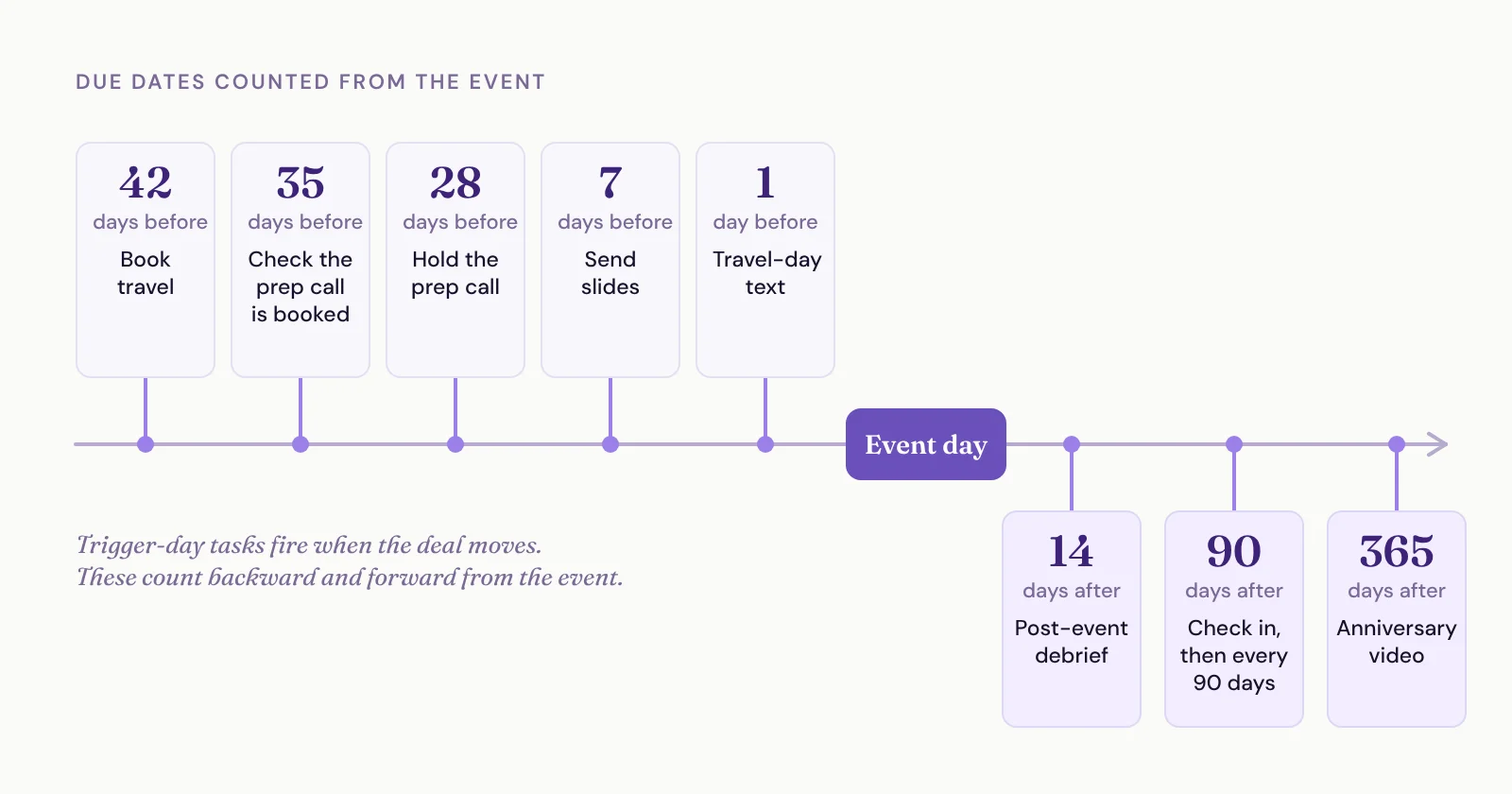
The event date. Book travel 42 days before the event. Send slides 7 days before. Record the anniversary video about a year after.
The second one is where most CRMs fall down. They can set a due date from the day something triggered, but not from a custom field like your event start date. That's why we built a feature called Task Templates into every SpeakerFlow account. You build the list once, pick the stage that fires it, and each due date counts forward from the stage change or backward from the event.
If your CRM can't do either, it's time for a better CRM.
The Keynote Checklist, Stage by Stage
This is one client's real list, lightly cleaned up. Their deals move through seven stages, so rename them to match yours.
Trigger day is the day the deal enters a stage, so "trigger day +3" means three days after it moved. Event is the event start date. Click through the stages below to see what fires and when.
Pick a deal stage to see the tasks that stage fires and their due dates. Use the arrows to move the event date and watch the event-based tasks shift with it.
Inquiry
A good inquiry has come through the door.
Trigger day +1: Record everything you know: the event, dates offered, budget and how they reached out.
Trigger day +1: Reply with a link to book a discovery call.
Trigger day +1: If they offered a date, hold it on your calendar.
Trigger day +5: Discovery call booked? If not, follow up with the link.
Trigger day +21: Still not booked? Follow up again.
Trigger day +30: No call yet? Send a break-up email, then decide whether to close it as lost and move them to a warm nurture.
For the emails to send and a tighter cadence, here's my 17-day follow-up plan for speaking inquiries.
In Discussions
They've shown up to a sales conversation.
One task: after the call, move the deal to its next stage, whether that's Proposal or Closed Lost. It's due trigger day +1.
Proposal
You've sent a proposal or pitched your price, and proposed the solution to their problem.
Trigger day: Create and send the proposal.
Trigger day: Attach the proposal to the deal and the contact.
Trigger day +3: Confirm they received it and offer to answer questions.
Trigger day +7: Follow up for a final decision. Match the timeline you agreed on the call.
Verbal Agreement
They've agreed to move forward.
Trigger day +1: Send a thank-you gift and add them to your holiday gift list.
Trigger day +1: Brief anyone helping with the event before the contract goes out.
Trigger day +1: Block the event on every calendar: out of office, client, location and bureau if there's one.
Trigger day +1: Create the deposit and balance-due invoices.
Trigger day +1: If books are part of the deal, schedule the book order.
Trigger day +2: Send the agreement, deposit invoice, W-9 and promo materials.
Trigger day +21: Signed agreement and deposit back? Follow up if not. Once both are in, move the deal to Booked.
If you're still building that agreement by hand, auto-filled agreements from your CRM save you the copy and paste.
Booked (Pending Delivery)
They're an active client, and you're still delivering the goods.
Trigger day: Record the event schedule and session format, and attach the signed agreement.
Trigger day: Send a link to book a post-event debrief.
42 days before the event: Book travel and send the client your travel details.
35 days before: Is the prep call on the calendar? Book it if not.
28 days before: Hold the prep call with the client's key contacts.
7 days before: Send slides.
1 day before: Text or email the client that you're on your way.
The travel task is a good example of a task that carries the how. This client's version spells out booking about 42 days out (earlier around holidays or for small airports), arriving the day before, their hotel order of preference, logging every confirmation on the deal and sending the client a travel details email.
42 days is their rule, not a law. A month can be too tight, and you can always move the date on a trip that needs it.
The travel-day message is short on purpose:
I'm on my way and looking forward to being with you very soon. If you need anything at all today, just let me know.
Delivered
You've delivered the goods, and everything's done.
14 days after the event: Hold the post-event debrief, if they booked one.
90 days after, then every 90 days: Check in with the client.
351 days after: Block time to record a one-year anniversary video.
358 days after: Record a personalized anniversary video for this client.
365 days after: Send the video with a priority-access offer for next year.
The 90-day check-in is my addition. Their list jumped from the debrief to the anniversary video, and that's a long time to go quiet.
The debrief is also the natural moment for the two asks people forget most. Here's how to ask for referrals after every gig, and what a post-talk feedback form should ask so the testimonials come in on their own.
Closed Lost
You've lost the deal.
Trigger day: Record why you lost it.
Trigger day: Add them to your warm nurture.
Trigger day +1: Send a thank-you note anyway.
10 months later: Circle back to see if there's a fit next year.
Build Your Version with AI
You don't have to start from a blank page. Copy this prompt into Claude, ChatGPT or whatever AI tool you like, and it'll interview you about how you actually run a gig:
What Doesn't Belong on the List
What makes the list is anything that has to happen to move your client through the journey. How you do it is a different document.
How do you book travel? That's an SOP. How do you build a slide deck? Also an SOP. The task says "book travel," and the SOP says how. Sometimes the short version of the SOP lives right in the task description, like the travel example above.
Steps that happen anyway don't need a task either. You don't need a reminder to show up to a call that's already on your calendar. When we turned this client's original spreadsheet into templates, we cut 11 steps because they were redundant.
Start with Tasks, Then Automate the Repetitive Ones
Don't try to automate all of this on day one.
Write down your ideal journey, from the first inquiry to a year after the event.
Turn each step into a task tied to a stage and a date.
Run it on a few events and fix what doesn't fit.
Automate the steps that are highly repetitive and the same every time, like the thank-you note, the next-year circle-back and adding holds to your calendar.
You can't automate a process you haven't defined yet. Tasks are how you define it.
"Won't I Get Buried in Tasks?"
If a long list scares you, the list isn't the problem. Getting buried means you're not in the habit of managing tasks yet, and no software fixes that for you. It's a habits problem, not a CRM problem. You have to look in the mirror and decide whether you're running this like a professional business.
Two things make it easier:
Give every task a type, like event management or sales, so you can look at one kind of work at a time.
Chunk your day by type. I'd honestly do promotion first and client delivery after, but plenty of people flip that.
AI helps here now too. Claude connected to your CRM can look across your open tasks and help you decide what actually matters today.
What If the Event Date Moves?
Then the dates move with it. An AI assistant connected to your CRM, like Claude, ChatGPT or your CRM's built-in assistant, can go through every open task on that deal and shift the due dates to match the new event date.
Copy the list, rename the stages and run your next gig off it. Your clients will notice you got there first.