Somebody says "send me a contract," and you open Word. That's when the clock starts.
You copy the last contract you sent. You hunt down every spot that needs a new name, date and fee. Then you read the whole thing a billion times to make sure the last client's name isn't still hiding in paragraph four.
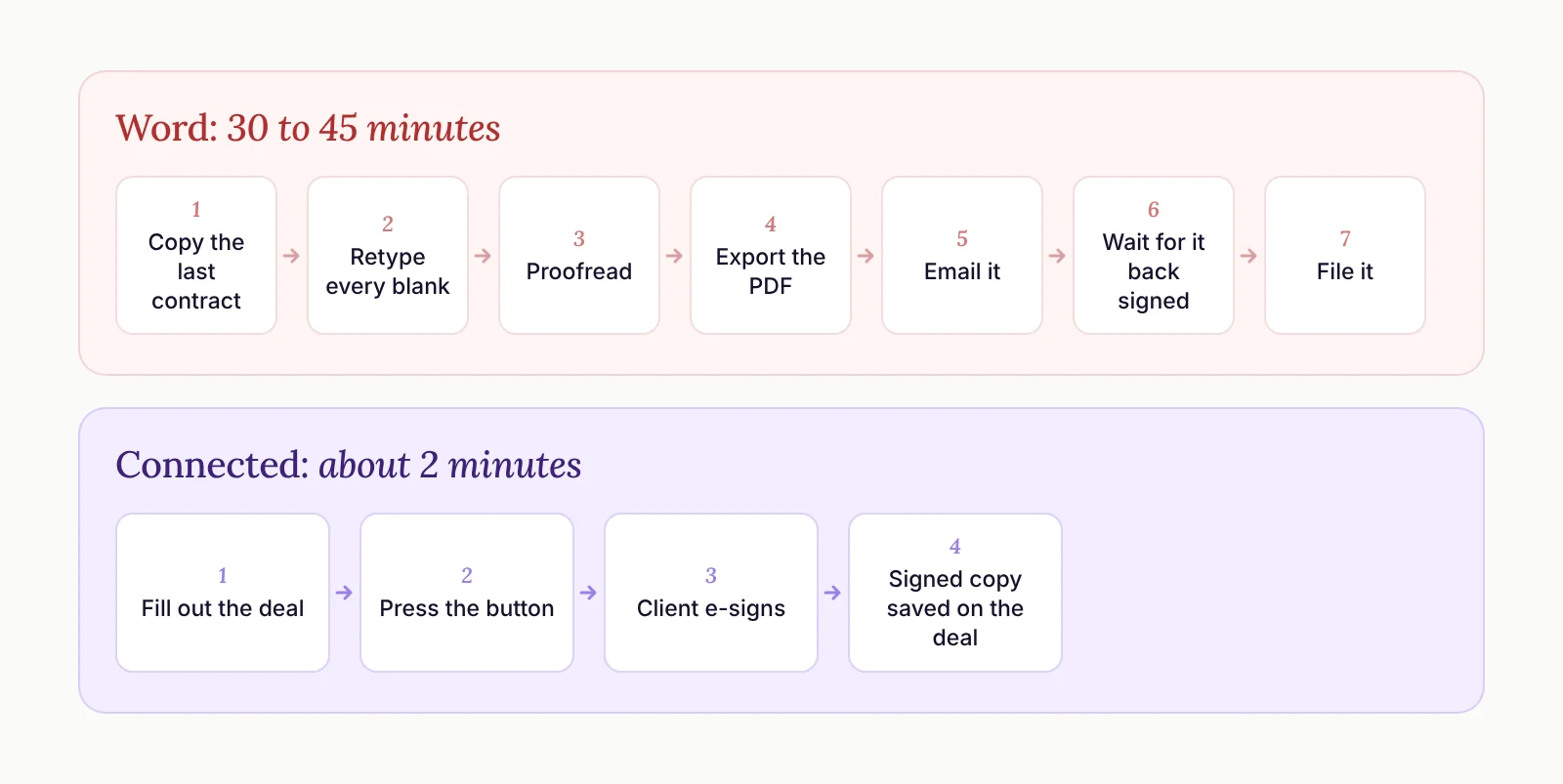
For most people, that's a 30 to 45 minute ordeal. When the contract fills itself out from your CRM, it takes about two minutes, because all you do is press a button.
So here's my answer for anyone still building contracts in Word. Every blank you fill out by hand should be a field in your CRM. Fill out the deal once, press the button, and the contract fills itself out.
What the Word Version Really Costs You
I hear some version of this on sales calls all the time. One speaker told me he keeps four Word templates. Every time a deal closes, he opens the right one and retypes the client's name, the date and the fee. He exports it as a PDF, emails it over and waits for a signed copy to come back. Sometimes it's e-signed. Sometimes the client prints it, signs it and emails back a PDF.
None of those steps is hard. Together they're grindy, and grindy tasks get pushed. The resistance to sitting down and building a contract is high enough that it takes much longer than it should to get one out the door.
And the friction doesn't stop with you.
First, there's sending it. That's the 30 to 45 minutes of copying, retyping and proofreading.
Then there's signing it. If you don't have an e-sign tool, you're sending a PDF, and now your client has to find a way to print it, sign it and get it back to you. You just gave homework to the person who wants to pay you.
Then there's filing it. Even if you upload the PDF to an e-sign app like DocuSign, the signed copy lives in DocuSign. Somebody has to download it, put it in the client's folder and attach it to the CRM. Let's call a spade a spade - that's not going to happen.
Standardize the Contract Before You Automate It
The first step has nothing to do with software. Standardize your agreement as much as humanly possible.
That means the spots you fill out are the same spots every time: company name, event date, program start time and so on. You might need a few versions, one for speaking, one for coaching, one for consulting. That's fine. Each one should still be the same document every time you use it.
Have a lawyer review it while you're at it, so you're keeping yourself safe.
And keep it simple. A lot of people want to get creative with contracts. Colors, custom design, a Canva template, yada yada. None of that seals the deal any more than a regular Word document with your logo on it. A contract's job is to be easy for the other person to sign.
Turn Every Blank into a Field on the Deal
Once the agreement is standard, it goes into the system, and the CRM fills in the blanks.
When we set this up for clients, we start with the obvious ones. Company name, event date, amount. The deal already has fields for those.
Then the math. A lot of contracts include a deposit, often 50% of the fee. The template can do that calculation itself, so you're never pulling out a calculator mid-contract.
Everything else gets a decision. Do we add a field to the CRM so you only have to press the button? Or would you rather edit that part of the contract by hand each time? Every client lands somewhere a little different.
If it were me, 100% of it would come from fields. I'd fill out the deal, hit the button and know the contract was filled out properly every single time.
The way I think about it, the deal is the source and the contract is just a printout of it.
That has a nice side effect, too. When every contract detail lives on the deal, you get long-term data you can actually report on. If your CRM still feels like a spreadsheet with extra steps, what lives on the deal record is usually where that starts.
Let the CRM Tell You What to Fill Out
The trickiest part of auto-filled contracts is knowing which fields need to be filled in before you press the button.
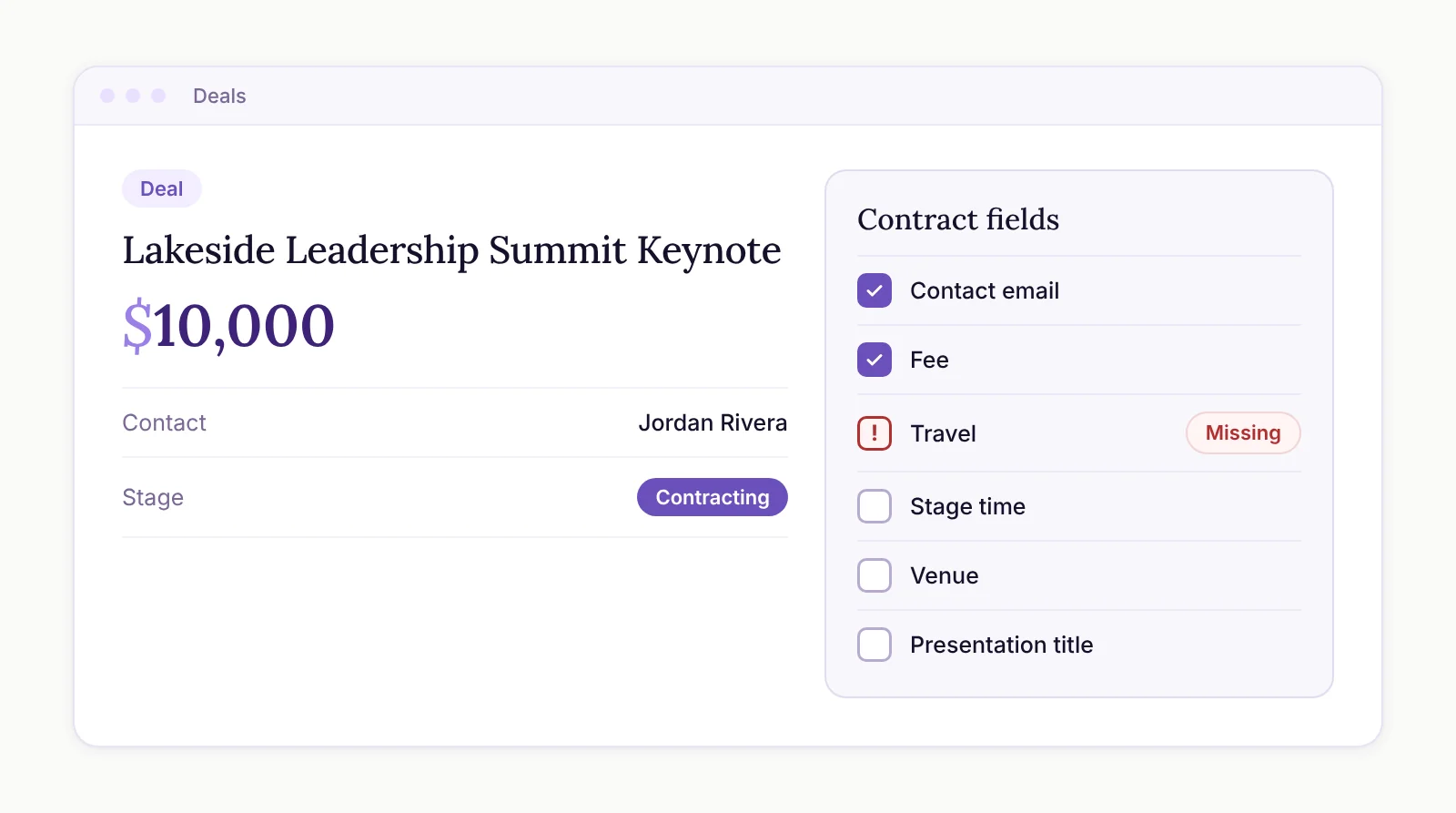
So the goal is for your CRM to tell you. When a deal reaches the contracting stage, it should show you exactly what the contract needs.
How strict that is depends on the person. For some clients we put a simple checklist right on the deal. For others, the CRM requires the fields before the deal can move forward. Both work. Pick the one you'll actually follow.
What a Connected Contract Flow Looks Like
Here's what changes when your CRM and your e-sign tool are talking to each other. We use Zoho CRM and Zoho Sign for this, but the shape is the same in any setup where the two are connected.
The client says yes. You fill out the deal, and the CRM shows you which fields the contract needs.
You press the button. The contract fills itself out from the deal.
It goes to the right person without any retyping, because the contact is already linked to the deal.
The moment it's sent, the contract is attached to the deal, with its status right there. You can see whether it's been sent or signed without opening another app.
When it's signed, the deal updates and the signed copy is already where it belongs. Nothing to download. Nothing to file.
From there, sending a contract is a touch like any other, so it gets a follow-up task to check that they signed. And once it's signed and the deal is won, the tasks to deliver the gig can load on their own.
Every little bit of friction from the Word version is gone. And when you cut 30 to 45 minutes of manual busywork out of every contract, you're buying back the only thing you can't buy, which is time.
Pro tip - the same idea works for proposals. Your CRM can fill those out dynamically too, and you can make them as beautiful as they're worth.
When Something Changes After You've Sent It
Dates move. Details change. In the Word world, that means doing the whole thing over, another 30 to 45 minutes of the same exact process.
When it's connected, you revoke the contract, update the fields on the deal and send a new one. The deal stays the source, and the new contract matches it automatically.
Even better, get the details right before the contract ever goes out. That's what the CRM's checklist is for.
Is It Worth It If You Only Send a Few Contracts a Month?
I get this one a lot, because most people aren't sending contracts every week. My answer is yes.
The time savings help, for sure. The bigger win is that the resistance is gone. When somebody asks for a contract, you can get it out immediately, while they're still excited about working with you.
That reinforces their trust in you right after they've decided to buy from you. When your processes are dialed and you're quick and easy to work with, the relationship is better long-term. That's why it's worth it.
The other objection I hear now and then is that editing a contract in a small box is harder than editing a Word doc. You can expand the box when you need to. That's about it.
Don't Automate the Send on Day One
Once this is running, it's tempting to skip the button and have the contract go out the second a deal moves stages. I wouldn't, at least not yet.
Press the button yourself for a while. Send a few. Refine the template. When you're sick of pressing it and you catch yourself thinking "why am I even pressing this button?", that's when it's time to automate. It's the same thinking behind Automate the Trigger, Not the Touch.
Until then, fill out the deal, press the button and get back to the work you actually like doing.