One of the beautiful things about speaking is that it's the best marketing vehicle on the planet.
If you're a professional speaker, you're usually getting paid to do it. Even when you're not, you're standing in front of a room of potential buyers for an hour, and every one of them chose to listen to you.
Think about what it costs to get in front of those people any other way. Client acquisition is expensive in any business. A stage hands it to you.
And most speakers walk off without a single new name in their system.
They nail the talk, soak up the applause, maybe trade a few business cards, and that's it. The audience goes home, and the leads go with them. Having this vehicle and not taking it seriously is, quite honestly, insane.
Let's fix that.
Who's in the Room Changes the Math
Not every room is full of buyers.
Speak to the staff of an organization, and most of the people in the seats can't hire you. They can refer you to other places, though, and some of them will be running a department in a couple of years.
Speak to an association full of industry leaders you could serve, and that room can turn into actual business. In a room where economic decision makers are present, expect somewhere around 3 to 7% to say they want to hire or refer you. There's more on what to do with attendees who can't hire you.
Either way, the system is the same. Only your expectations change.
What Is a Stage-to-Lead System?
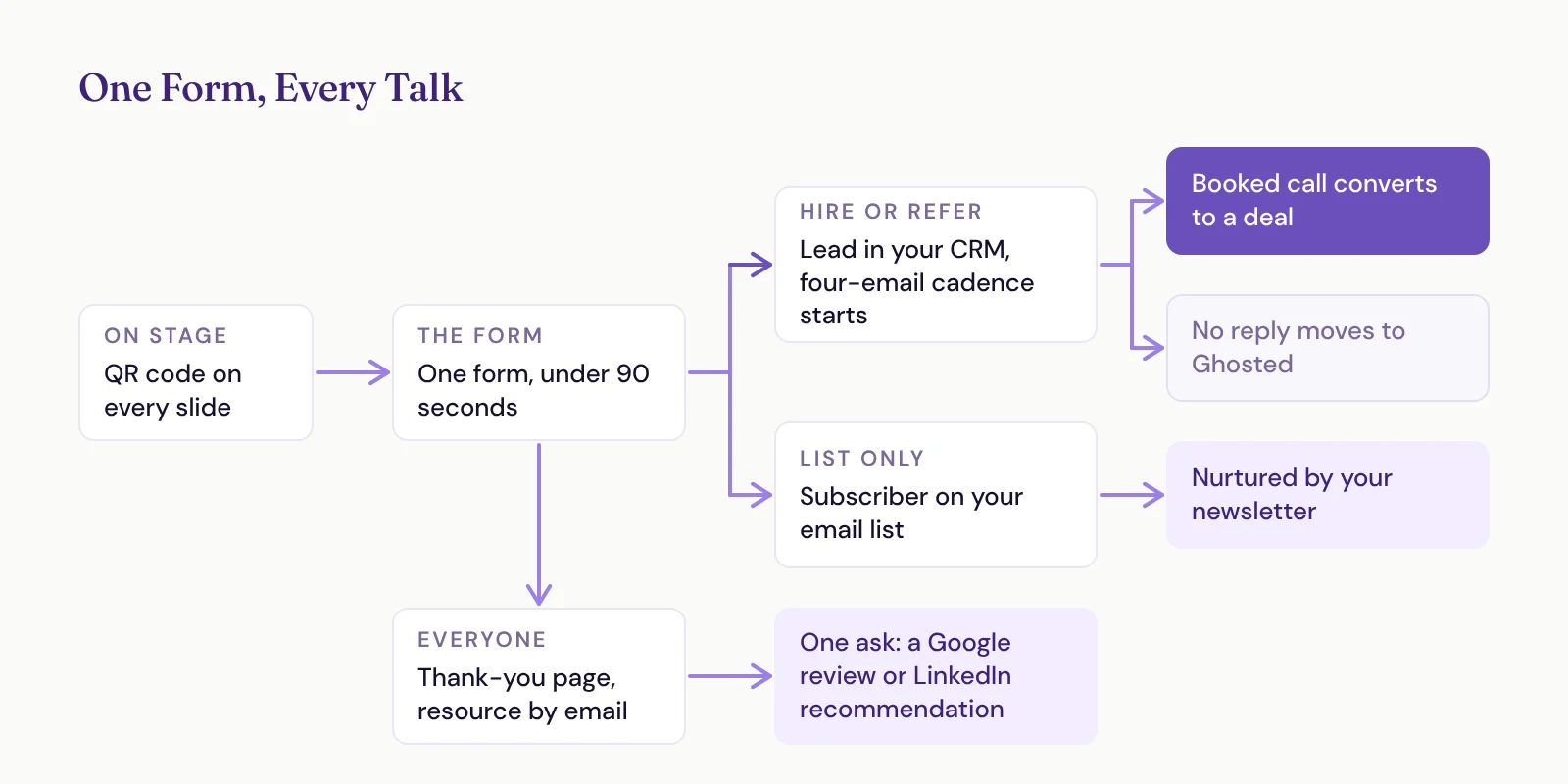
It's the path from someone sitting in row 12 to a record in your CRM with the follow-up already running.
It has four parts:
A form people can finish in under 90 seconds
A reason for them to fill it out
Routing that sorts booking leads, referral leads and subscribers on its own
Follow-up that goes out whether you remember it or not
Then there's a pro tip on the thank-you page that most speakers skip entirely. We'll get there.
Build a Form They Can Finish in 90 Seconds
Your form combines two things: their feedback, and you asking whether they want to hire you or refer you.
It has to be quick. Some tools out there really drag this out, and it takes people 3 or 4 minutes to get through the whole thing. That's not what you want. Aim for under 90 seconds.
Sometimes it's as simple as:
First name, last name and email
A checkbox to join your list that says what they'll get, like "Get weekly updates from [your name] on X, Y and Z"
An optional open box: "Any feedback you'd like to share?"
One question, "I'm interested in..." with three answers: talking to you about hiring you for an upcoming event, referring you to someone they know, or just staying up to date
That's the whole thing. The question-by-question version, including which fields to show only after a yes, is in what a post-talk feedback form should ask.
Look at what that one form gets you.
Feedback you can process and hand to the event planner or the organization that brought you in, with all the great things their people said. Planners love that.
Subscribers who asked to hear from you.
And leads who qualified themselves. Someone who says they want to hire you or refer you is a lead. Someone who only ticks the list box is a subscriber, and that's fine. They're at a different stage of the customer journey.
Let the System Do the Follow-Up
Here's where most speakers drop the ball. Twelve people say they want to hire you, and now you've got twelve emails to remember to send. Then you have to send them again. Then again.
Don't. Ideally, this is all automatic. It's what we build day in and day out.
Anyone who says they want to hire you lands in your CRM as a lead and starts a four-email cadence on the spot, spread over about two weeks:
The next morning: thanks for the feedback. It looks like you wanted to chat about working together. When's a good time?
Three days later: we still don't have a call on the books, and calendars fill up quickly after an event like this. Want to chat about your upcoming event?
Four days later: is this not the right time? You mentioned you wanted to chat after my session.
Three or four days after that: seems like now must not be a good time. No worries. If that changes, reach out.
Referral leads get the same shape, phrased for the referral: thanks for being open to referring me, who should I talk to?
The exact emails are in the four-email fix for "hire me" leads, so I won't repeat them here.
Worst-case scenario, they never reply. They move to Ghosted in your leads, which is exactly where a lead with no response should go, and they're still on your email list getting nurtured.
Nobody falls through the cracks, and you didn't have to remember a thing.
What Not to Do on Stage
There's some common advice in our industry to wait until the last 10 minutes or so of your keynote, put up the QR code, ask for feedback and then wait 3 or 4 minutes while everyone fills it out.
Don't.
What ends up happening is you tank the energy in the room. Event planners and professionals don't look upon this highly. They want their audience locked in. They're paying a lot of money for you to put on a great show, educate their people and motivate them.
Taking all the energy out of the room at the end isn't the move.
Will pausing get you a few more submissions? It could. That isn't even a sure thing. The cost is, though. You trade the energy in the room for a handful of form fills.
I'll level with you - this is mostly a lower-fee speaker play. The speakers doing it often aren't the speakers you aspire to be.
Where Should the QR Code Go?
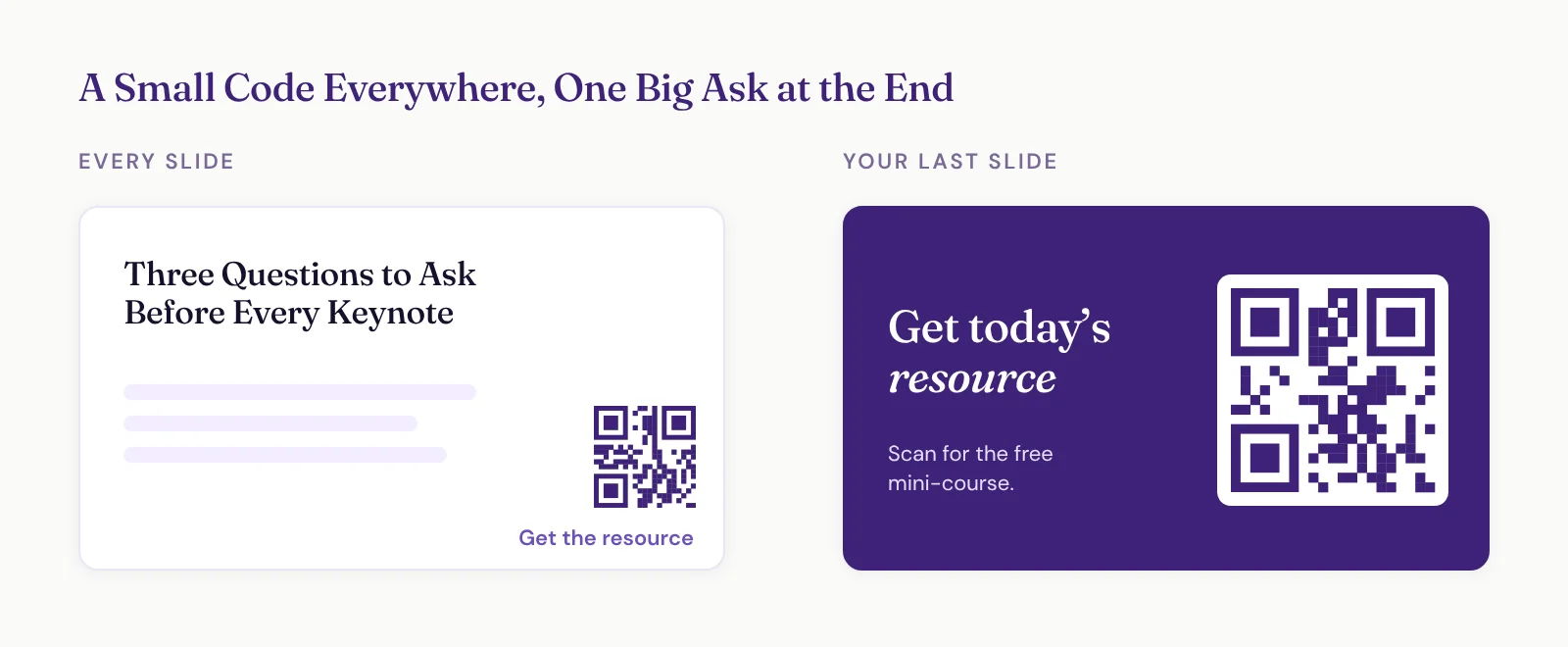
On every slide.
Put it in the bottom corner of every slide in your deck, with a line like "Get today's resource." At any point in the talk, someone can scan it, fill out the form and get the resource by email afterward. No pause required.
Then, at the very end, once you've delivered the thing and the room is hooked, take your round of applause and put up the final slide. That slide has one job: "Get today's resource," with the QR code big enough to scan from the back row.
Offer a Resource, Not a Feedback Request
Here's what a lot of speakers say on that last slide: "Leave me feedback, I'd really appreciate it."
That's about you. It's not valuable for them to leave you feedback.
Give them something for doing it instead. Put up the QR code with "Get today's resource," and make the resource worth scanning for.
Slides are what most speakers reach for, and honestly, they're a little weak. People do want them, but every time you change your deck, you have to swap the file out again.
Think about how your audience actually likes to take in content, and get creative:
A PDF guide
A checklist
An assessment
A short video mini-series, or a set of shorts they can watch
Whatever it is, it should be a real, tangible takeaway that goes with the talk.
Here's an example. If I were speaking to speakers about systems, I might give away a mini-course on how to build the backend of your business yourself in 90 days. It'd be high level, and they'd have to go do it themselves. I'm betting most won't. But I'm handing them everything they need to execute on it, for free.
Give away something insanely valuable. That's what gets people scanning.
As they fill out the form, they leave feedback along the way. They do the thing. Then the resource shows up in their inbox a minute later.
You use the same form and the same QR code at every talk. Before each event, you swap the resource in that email and update the event name on the form, so every lead and subscriber is tagged with the talk they came from.
Pro Tip: Turn the Thank-You Page into Public Proof
After someone submits the form, they land on a thank-you page. Most speakers waste it.
Use it to ask for one more thing: a Google review or a LinkedIn recommendation. Show them the feedback they just wrote so they can copy and paste it, with a link straight to where it goes.
Pick one, though. The page gets one call to action, not two. Prioritize one platform, build it up, then switch.
Someone who just told you they loved your talk is in exactly the right mood to say it publicly.
Private feedback lives in a spreadsheet, and nobody outside your business ever sees it. Public reviews show up when a planner searches for you. They also give AI assistants like ChatGPT and Claude something to point to when someone asks for a speaker on your topic.
One of our clients started with Google and pumped reviews in with this page. They're closing in on 1,000, and once they hit it, they're switching the page to LinkedIn recommendations. Maybe they'll go back and forth. Either way, getting your reviews out in public will only help.
Another client came to us from exactly that angle. He wanted to show up more in AI, and he felt like he was handing his reviews to a platform that doesn't really rank for anything. He wanted to take control of that.
So we put the whole play together: "Get today's resource" on his final slide, the resource delivered by email, and a thank-you page that showed his audience their own feedback with a link to leave a Google review. He collected over 100 Google reviews the first time he used it.
The Stage-to-Lead Checklist
One form that takes under 90 seconds to fill out
Name, email, a list checkbox, optional feedback and one hire, refer or stay-updated question
Hire and refer answers go to your CRM as leads and start a cadence automatically
List-only answers go to your email list as subscribers
The event name updated on the form before every talk
A QR code in the corner of every slide
No pause in the talk to collect feedback
A final slide that says "Get today's resource"
The resource delivered by email after they submit
A thank-you page with one ask: a Google review or a LinkedIn recommendation