"I've got all these leads, and I have no idea what to do with them."
I hear that one a lot. It usually comes with one of two problems. Either the leads never made it into the CRM, because nobody wants to clutter it up. Or they did, and now there's one giant list of names with no clue who's where.
Both come from the same place. The CRM is being treated like a filing cabinet.
Your CRM shouldn't be a static database of people. It should be a database of people and where they are in your process. Every lead is always moving, either toward a sales call or out of your pipeline, and your lead stages are how you see it.
I think of it like water. A bad CRM is a swamp. Stagnant, murky, and nobody wants to wade in. A good one is an ocean. There's a current, and everything in it moves in a predictable direction.
Here's every lead stage we use, what each one means and exactly what to do with a lead in it.
What a Lead Is (and What It's For)
A lead is someone you believe you could do business with but haven't yet. They came to you through your contact form, an email or a referral (inbound), or you found them yourself (outbound).
Two things a lead isn't. Someone who joined your newsletter or grabbed your free guide is a subscriber, and I've covered why newsletter subscribers don't belong in your CRM. And someone who's booked a sales call with you isn't a lead anymore. That's a deal, and I break down when a lead becomes a deal in its own post.
So leads have exactly one job - getting a sales call on the calendar. That's business development. Every stage below either moves a lead closer to that call or closes it out.
Why Your Leads Pile Up
Most of the time, the follow-up isn't what breaks. People do the follow-up. A form comes in, they reply by email, maybe they even send a second one.
What they skip is updating the lead status. The email goes out, but the lead sits in New forever. Do that for a year and New turns into a junk drawer. You can't tell who you've reached out to, who replied and who went dark.
We had a client recently with about 7,000 people sitting in New and a catch-all Subscriber status. On our call, I moved every booking lead into Reaching Out, and he went through them. Anyone he was still going to contact stayed in Reaching Out with a follow-up task. Anyone he'd given up on went to Ghosted. The people who were really subscribers came out of the CRM and stayed on his email list.
Now he's actively moving leads through his process. And because leads actually move, he can see how his outreach is doing and how many leads turn into deals. You don't get that data from a list that just sits there.
The good news is it's never been easier to keep up. Connect AI to your CRM and you can just ask it to move leads along for you. I cover what Claude can do once it's plugged into your CRM separately.
The Lead Stages, One by One
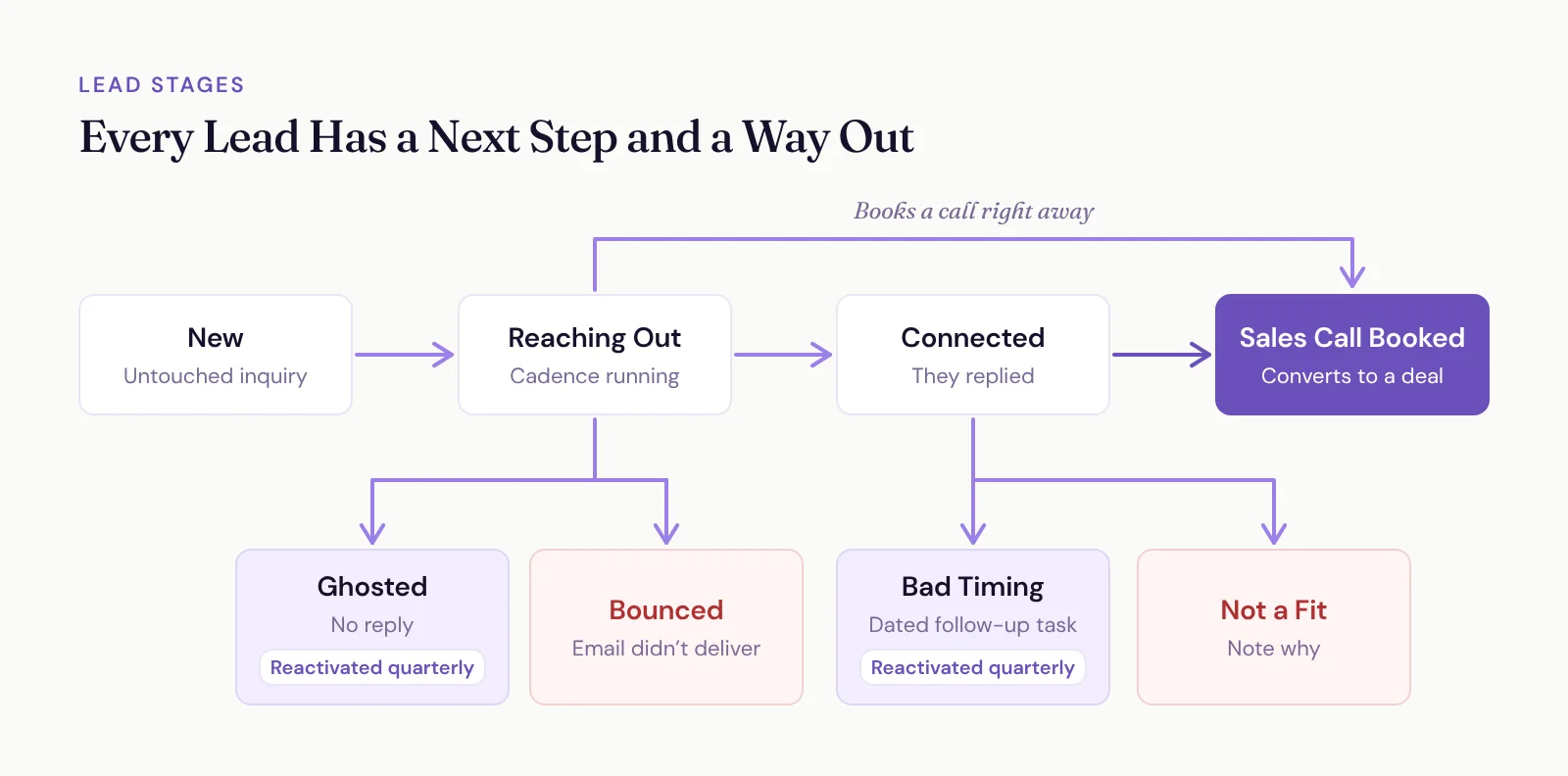
Here's the whole board at a glance.
New
New is an inbox, not a home. An inquiry from your contact form, an email or a referral lands here, you start reaching out right away, and it moves to Reaching Out.
A lead should sit in New for hours, not months. If there are more than a handful of people in there, something's stuck.
Reaching Out
You've started your follow-up and you're waiting on a reply. For an inbound inquiry, that's four touches: a personal reply and three short follow-ups over about two weeks, then a decision on day 17. I lay out the 17-day follow-up plan, emails and all, in another post.
Every touch has one goal - land a sales call. If they book one, skip the rest of the stages and convert them into a deal. If they reply, they're Connected. If the cadence runs out and you've heard nothing, they're Ghosted.
Connected
They replied. Even a lukewarm reply counts, because any reply is a huge deal compared to silence.
From here, you go back and forth until one of three things happens. They book a sales call (convert them to a deal), they tell you no (Not a Fit), or they tell you now isn't a good time (Bad Timing).
A Connected lead should always have a next task. A conversation with no next step quietly turns back into silence.
Bad Timing
"Love this, but let's talk later." Put them here and set a follow-up task. If they gave you a date, use it. If they didn't, here's my default:
Speaking, and you know when the event is: check in at least 90 days before the event.
Already inside that 90-day window: every 30 days at a minimum.
Coaching, consulting or anything else: 90 days out is usually fine.
When the task comes up, reach out. If they're ready, they're back to Connected.
Ghosted
The cadence ran out and they never replied. Stop the one-to-one follow-up. You've done your part, and a fifth "just checking in" isn't going to be the one that lands.
Ghosted leads aren't trash, though. They go on your quarterly reactivator list, which I'll get to in a second.
Bounced
Your email didn't deliver. Your CRM should move people here for you automatically when an email bounces. If they're worth it, find a better address. If not, let them go.
Not a Fit
For people who are straight up not a fit. Wrong budget, wrong audience, wrong everything. Add a note on why and leave them there.
Should You Delete Leads That Go Nowhere?
No. Ghosted, Bounced and Not a Fit are where dead leads go instead of the trash.
Two years from now, when the same person emails you again, your CRM flags the duplicate and you'll know exactly what happened last time. Delete them and you're starting from zero with someone who already told you no.
What to Do with Ghosted and Bad Timing Leads: The Quarterly Reactivator
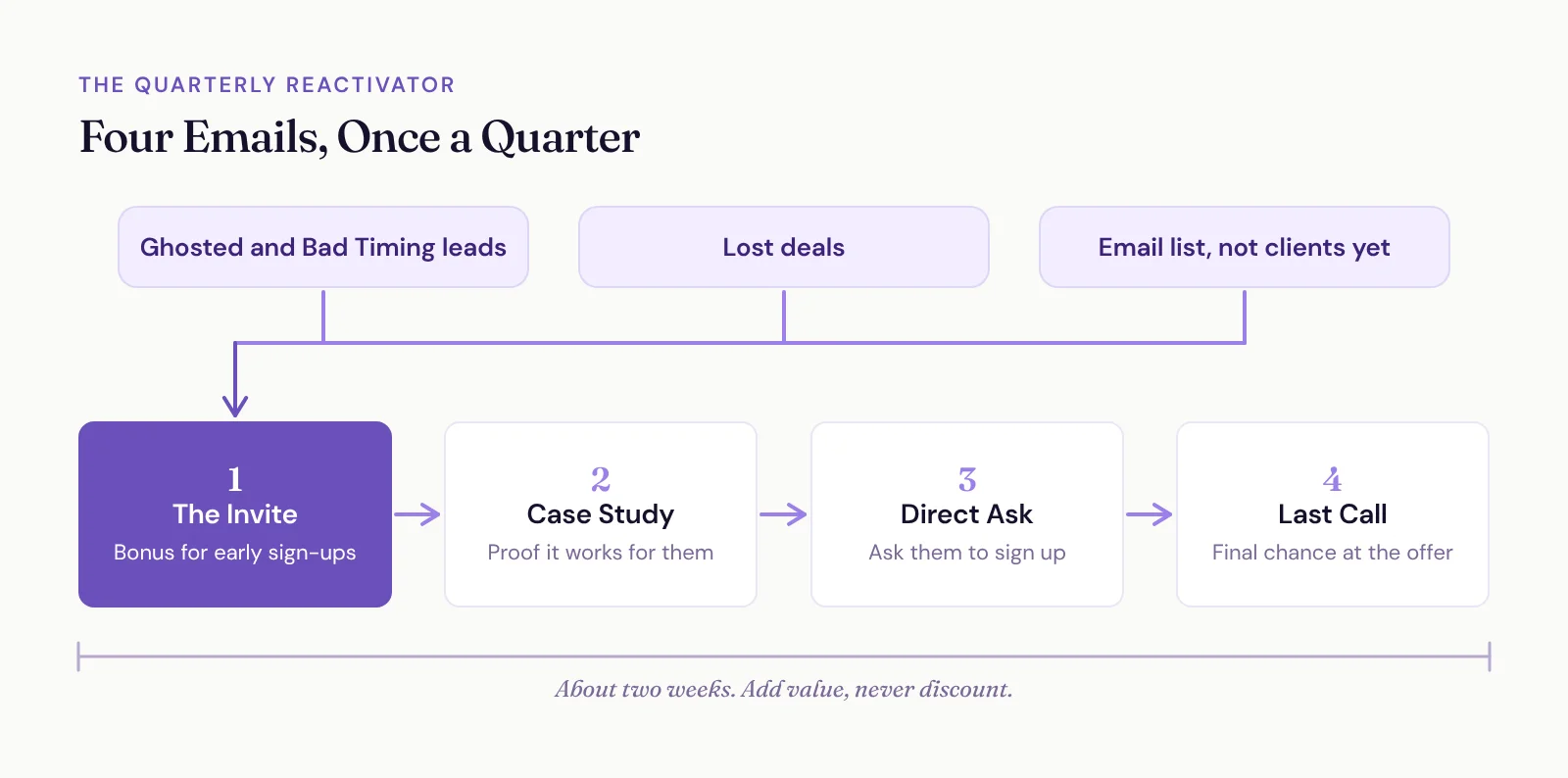
Once a quarter, we send a reactivator. It's a short email series to everyone who's gone quiet: leads who went dark (Ghosted and Bad Timing), deals you lost, and people on your email list who aren't clients yet.
It's four emails over about two weeks:
The invite. Something like, "I'm looking for [number] people who want to [result] before [date]. Anyone who signs up beforehand gets [extra value]. Know anyone who could be a fit?" Naturally, a lot of people raise their hand and say, "Oh, I could be a fit."
A case study. Proof it works for people like them.
A direct ask.
Last call.
Notice what's missing - a discount. You don't discount your offer. You add value to it.
Fee increases are a great excuse to run one. Our prices go up in the new year, so our Q4 2026 reactivator says something like, "This is the last time to get the legacy price. Even if you want to start in the new year, that's okay, but if you want to lock it in before the price goes up, you can."
Run it every quarter and it becomes a driver of business you can lean on. It's also how you stay in touch with everyone who ghosted you, without chasing each one by hand.
If You Do Heavy Outbound, Split New in Two
Outbound changes things a little. When you prospect people, you need a parking spot while you research them before reaching out. Park them in New and your fresh inbound inquiries get buried under a prospect list.
So rename New to New Inbound and add a column called New Outbound. Inbound always comes first, since those people came to you. Outbound gets worked as you have room.
One asterisk. If you're sending more than about five outreach emails a day, that volume doesn't belong in your CRM at all.
Cold email to hundreds or thousands of people from the inbox connected to your CRM is how you burn your domain's reputation. Then your follow-ups to real inquiries start landing in spam too.
There's a hard ceiling as well. Google Workspace caps a single user at 2,000 messages a day. Drop 100 new prospects a day into a 10-email cadence, and once it's fully running you're sending around 1,000 emails a day before you've written a single real reply. That's half your limit, gone.
Use a dedicated cold email tool like Instantly, sending from separate addresses and domains so your main domain stays clean. When someone replies with interest, that's when they come into your CRM as a lead.
How to Clear the Backlog You Already Have
If your lead list is already a swamp, drain it in one sitting. Go through every lead and ask three questions:
Is this actually a lead? If they're really a subscriber, get them out of the CRM and onto your email list.
Have I already exhausted my outreach? If you're done with them, they're Ghosted.
Is it still worth reaching out? Move them to Reaching Out, with a follow-up task so it actually happens.
Then switch your lead list to a Kanban view by lead status, so you see the whole board instead of one long list.
Looking at thousands of leads? Don't do it one at a time. Mass-update them in batches, or let AI do the sorting. I walk through how to clean up your CRM in a few hours with AI doing the heavy lifting.
After that, the habit is simple. Every time you send a touch or get a reply, update the status. That's the whole trick, and it's what keeps your CRM an ocean instead of a swamp.