Is Sending a Booking Link Rude?
No. A booking link saves you and the other person five emails and a time zone conversion. That's respectful, not rude.
We've used booking links at SpeakerFlow for our entire existence. They've never cost us a dime of business. And if someone ever did take real offense to one, I'll level with you - they probably weren't an ideal client anyway.
What does feel cold is a bare link. Someone says "I'd love to find a time," and you reply with a URL and nothing else. The fix for that is one sentence, and we'll get to it.
What Calendar Battleship Actually Costs You
Calendar Battleship is the back-and-forth. "Does Tuesday at 2 work?" "How about Wednesday?" "Wait, is that your time or mine?" Miss. Miss. Hit.
We worked with a speaker who had a scheduling tool and didn't use it. His assistant booked every call by hand. She'd check his calendar, message him to ask if a day worked, wait for his yes, then email the buyer. When I asked if that took a lot of time, he didn't hesitate: "it takes a lot of time."
That's the hidden cost. Say every round of coordination eats half an hour of your assistant's day. That's money out of your pocket for work your calendar can do on its own, and hours your assistant could spend on something that actually moves the business.
It scales the wrong way, too. One of our clients, Ferguson Alliance, had a staff member spending 30 hours a week coordinating meetings across their team. We set the whole team up on booking links. That person still works there. They just don't do that job anymore. They're doing higher-level work, and the company got back 30 hours of a human being's week.
"But I'll Lose Control of My Calendar"
This is the real objection, more than rudeness. People picture opening their booking tool every time something changes and fiddling with their availability.
That's not how it works. A booking tool is always reading your calendar. Once your link is set up, you should almost never open the tool again. You manage everything from your calendar.
Here's mine. My booking tool says I'm available Tuesday through Thursday, 9 to 5. On my actual calendar, I have recurring blocks from 9 to 1 on those days, so nobody can book me before 1 p.m. When I travel, I add an all-day event for every day I'm gone. That's it.
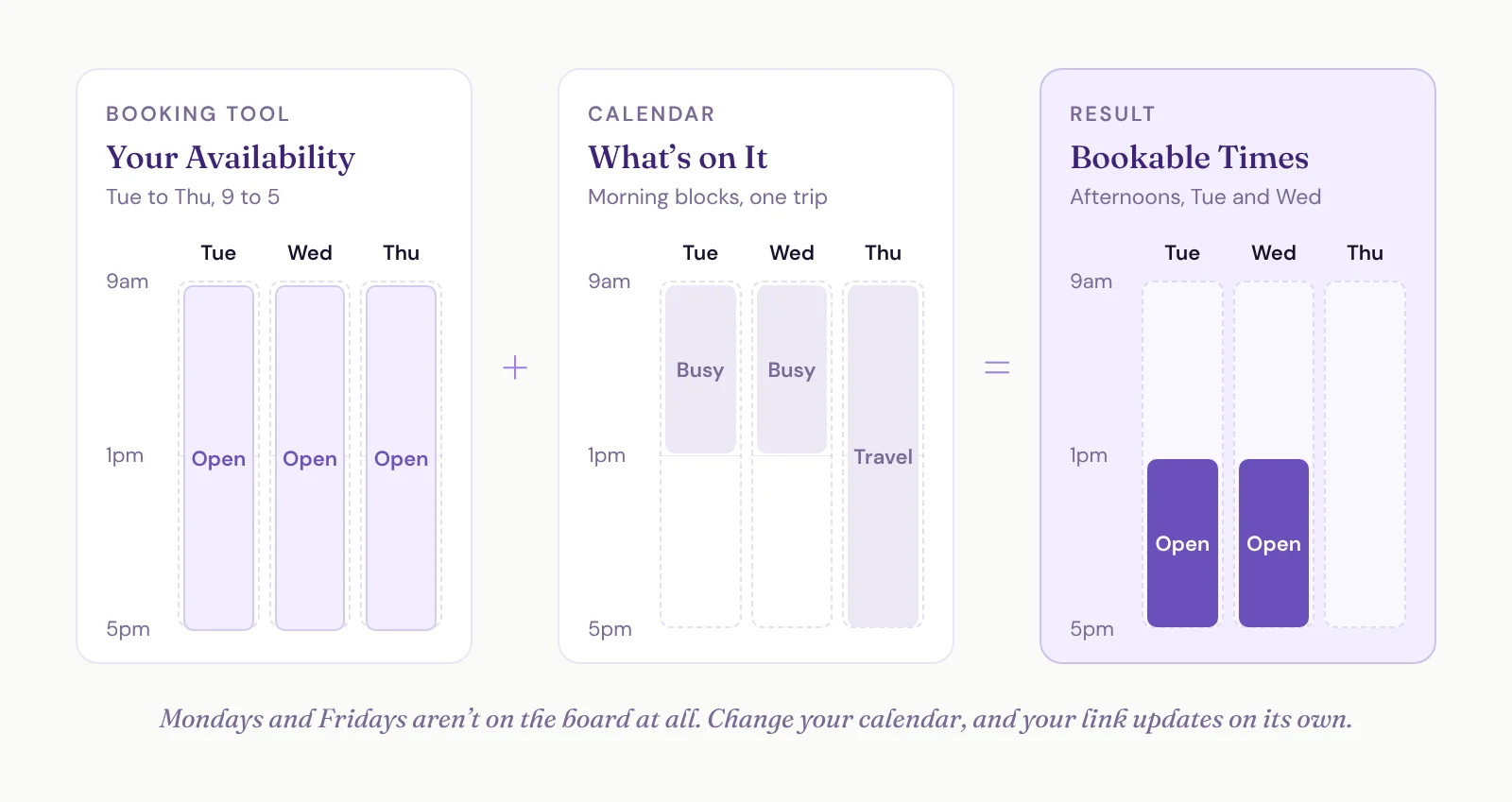
Why leave 9 to 5 in the tool if I never take morning meetings? Because some week I might drop a block or move it around. When I change my calendar, my link updates on its own. I never have to go back into the tool.
As long as your calendar is a true picture of your day, your link won't book over it. When it does, it's almost always a setting, a calendar that isn't connected or an integration that broke. That's rare.
Set Your Calendar Rules Once
When we set up booking links for a client (we use Zoho Bookings), this is the order:
Connect your video app. Zoom, Microsoft Teams or both, so every booking gets its own meeting link.
Connect your calendar. Google, Microsoft or whatever you use, so the tool reads your calendar and writes bookings back to it.
Set your default availability. The days and hours you'd ever take a meeting. Leave days off entirely if you never meet then. I don't take meetings on Mondays or Fridays, so those days aren't in my availability at all, even when my calendar is wide open.
Set a booking window. I don't let anyone book more than about three weeks out.
Turn off same-day booking. When I sit down in the morning, I know exactly what my day looks like.
Decide on buffers. If you want breathing room, 30 minutes after each meeting is a good default.
Put your recurring blocks on your calendar, not in the tool. Deep work, admin, whatever's sacred.
On buffers, I'm the odd one out. I run meetings back to back from 1 to 5. When I tried 30-minute buffers, I just burned the 30 minutes, because it takes my brain about 20 to switch gears anyway. So I do the hard stuff in the morning and stack meetings in the afternoon. That's not everybody's cup of tea. Try buffers, and if you catch yourself wasting them, drop them.
Pro tip: connect your personal calendar too. This is where people get hung up most. Share your personal calendar with your work calendar and have your booking tool check both for conflicts. Mine lives outside SpeakerFlow, and my link checks both.
For gigs, in a perfect world your CRM sends your event dates to your calendar so you never type them in. Either way, get in the habit of blocking the whole trip the moment a deal closes. Three or four days in one fell swoop, travel included, and that's that.
Now your assistant's job changes. Instead of booking meetings, they keep your blocks accurate. That's a much smaller job.
Make the Link Feel Personal
The difference between a cold link and a warm one is a sentence or two. Here's the reply I send when someone asks to meet. Link the words "Here's my link" to your booking page.
[Here's my link] if you want to grab a time on my calendar. If you'd prefer to play Calendar Battleship, I'm game. Let me know what days and times work for you and we'll coordinate.
Talk soon!
Offering Calendar Battleship takes the sting out completely. You're giving them a choice instead of forcing a link on them. And 99% of the time, they book through the link anyway, because it's the path of least resistance. Plus, people laugh at "Calendar Battleship." Everybody knows exactly what it means.
Send your own link, too. On our website, there's a shared link for our free Systems Workshop, so whichever of us is open takes the call. But when Austin or I are working with someone we already know, we send our personal link. If I built the relationship, it'd be weird for that person to land on a call with Austin, and vice versa.
There are still times to play Calendar Battleship on purpose. If someone asks for it, play. And if they're in the UK or further out and your hours barely overlap, back-and-forth is the default. That's fine. It's the exception, not your whole week.
Why Your Booking Link Breaks
Most of the time, it doesn't. When it does, it's usually one of these:
A password changed. This is the big one. You update your Google or Microsoft password, and the connection to your booking tool quietly stops working. Reconnect it everywhere that account is integrated.
A calendar isn't connected. If a conflict lives on a calendar your tool doesn't check, like a personal one, it can't block that time.
Your calendar isn't the truth. If the trip is in your head and not on your calendar, your link has no way of knowing.
Time zones are too far apart. Your 1 to 5 might be the middle of their night. That's a Calendar Battleship situation.
None of these are the end of the world. You'll catch them. Just check your connections any time you change a password.
What Happens after Someone Books
The booking is where your CRM should take over. When someone books with us, the system:
Looks the person up in the CRM.
Adds a note to their record if they're already there, and can create a task.
Creates them as a lead if they're not.
Logs a note and leaves a task if it's a sales call.
A booked sales call is also the moment a lead becomes a deal. And if your booking link is the next step after your contact form or the ask in your inquiry follow-up emails, this is what makes those flows run without you touching anything.
After the call, an AI notetaker can drop the summary and next steps on that same record. That's a post of its own.